Override a single shutter at panel level
Give one shutter its own design and finish without affecting the rest of the cabinet.
Each individual shutter in a system can be given its own shutter design and finish, so one panel can be gloss while another is wood; the change is made on that shutter rather than on the whole cabinet.
✓ 21 اکتوبر، 2026 کو پروڈکٹ میں جانچا گیا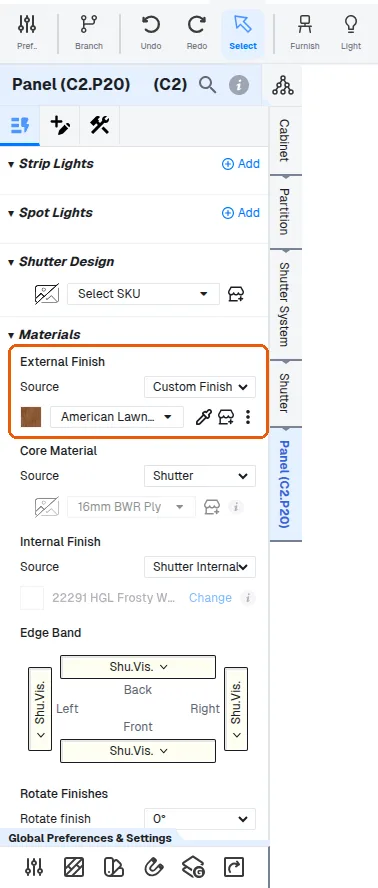
Shutters are handled separately through the shutter system, where each shutter can carry its own design and finish.
✓ 21 اکتوبر، 2026 کو پروڈکٹ میں جانچا گیا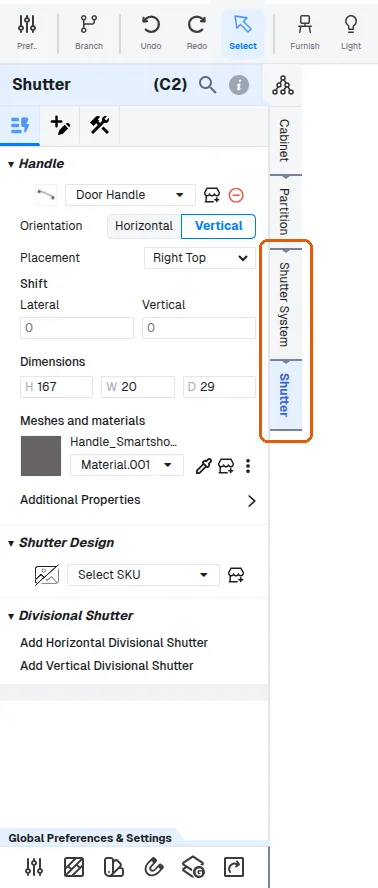
To change one shutter without affecting the others, click that specific shutter and make the change on its Panel level (Panel > Materials), which holds that shutter's material and finish options.
✓ 21 اکتوبر، 2026 کو پروڈکٹ میں جانچا گیا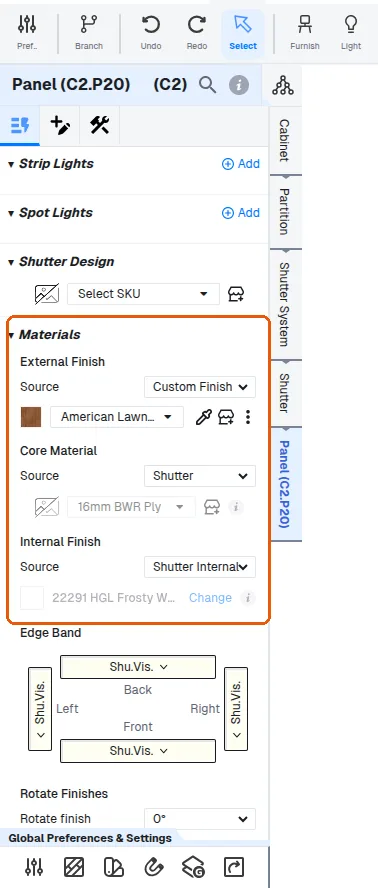
The Shutter level holds its design, mirrors and handle.
✓ 21 اکتوبر، 2026 کو پروڈکٹ میں جانچا گیاTo customize a shutter panel, open the construction settings and scroll to the panel profiles section, click the shutter panel, set the panel level to custom, then choose the core material from the shutter dropdown and select the shutter design (profile, core material, glass) at panel level.
To customise a panel, select it and open its Construction tab; the Edit Shape and Edit Panel Design options are listed there.
The Construction tab of a unit's customization panel holds the settings for how the unit is built, including the shutter profile selection.