Understand what elevation views include and how to fix missing elements
Learn how elevation views auto-close cabinet shutters and doors, which elements they include, and how to bring back anything missing.
When an elevation view is opened or drawn, the application automatically closes all cabinet doors, shutters, and drawers of the units in view - an elevation always shows units in their closed state, and this is not user-configurable per elevation.
✓ Checked in the product on 22 October 2026When the elevation is anchored to a cabinet or corner unit (or you are in Room view), only elements belonging to that same room are included; furniture from adjacent rooms will not appear even if it is physically behind the wall.
Elements behind the elevation camera or outside its capture volume are excluded as well.
If something is missing from an elevation, check that it is in the same room as the elevation's anchor unit and on a visible layer.
For a clean elevation of a cabinet run, use the Cabinet Elevation type (Multi Cabinet Elevation) rather than a custom elevation.
The Cabinet Elevation type generates the elevation of all cabinets in a straight line with the current cabinet.
✓ Checked in the product on 22 October 2026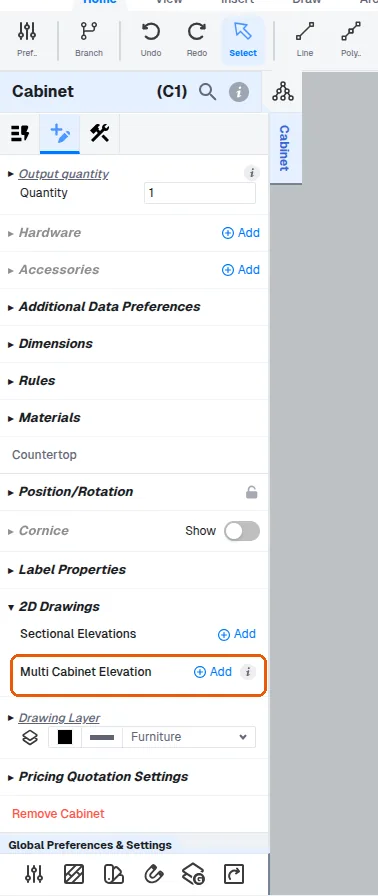
The Cabinet Elevation type is recommended when cabinets are not against a wall.
This is the recommended approach for island units, where cabinets face different directions and there is no back wall: select any one of the units and generate the multi-cabinet elevation, which detects and generates the view even without a wall.
Selecting a cabinet and using the Cabinet Elevation (Multi Cabinet Elevation) option generates the elevation of all cabinets in a straight line with the current cabinet; if no other units are in line with it, only that cabinet's elevation is produced.
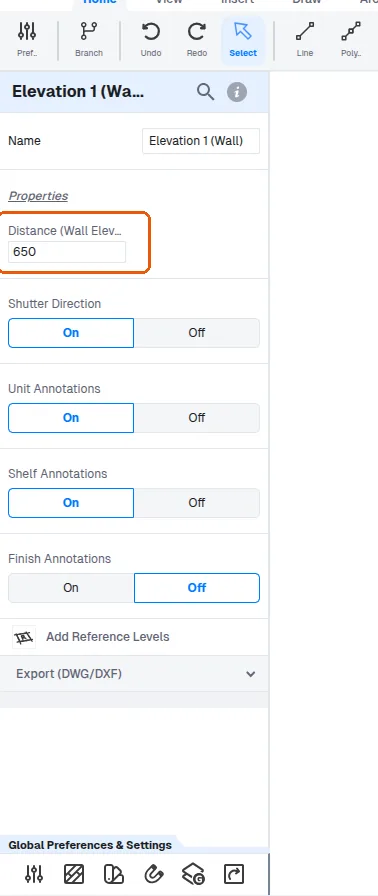
✓ Checked in the product on 22 October 2026If a unit is on a visible layer but still missing from the elevation, its distance from the wall may put it outside the elevation's capture volume; the elevation's Distance (Wall Elevation View Distance) value can be adjusted so the unit falls within range and appears.
✓ Checked in the product on 22 October 2026