Fix a panel dimension so it stops resizing with the unit
Set a panel length, depth or height to a fixed value so resizing the cabinet or wardrobe leaves that panel size unchanged.
A panel dimension (length or depth) can be set to 'fixed'.
✓ 2026 ഒക്ടോബർ 22-ന് പ്രോഡക്റ്റിൽ പരിശോധിച്ചു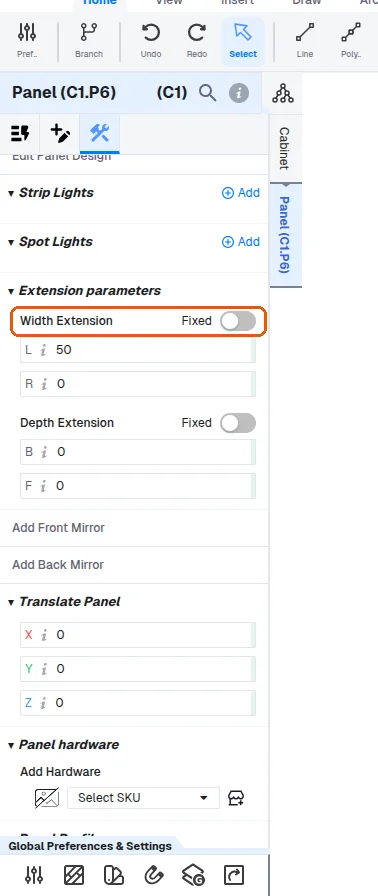
Once fixed, resizing the cabinet/wardrobe no longer changes that panel dimension - the requested size is remembered as an expected value but the physical panel keeps its fixed size.
An offset setting controls which side the panel stays anchored to (e.g. left vs right, back vs front).
✓ 2026 ഒക്ടോബർ 22-ന് പ്രോഡക്റ്റിൽ പരിശോധിച്ചു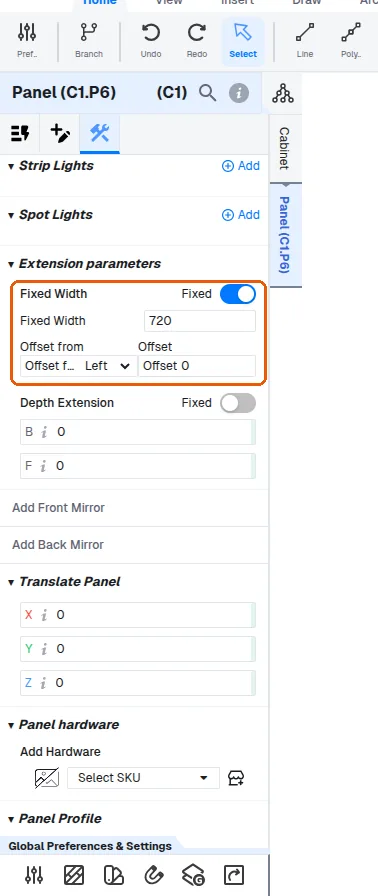
Fixed dimensions also stop automatic panel extensions from being added to the finished (cutlist) dimension.
✓ 2026 ഒക്ടോബർ 22-ന് പ്രോഡക്റ്റിൽ പരിശോധിച്ചുA panel's width can also be positioned by choosing an offset from the left or right side.
✓ 2026 ഒക്ടോബർ 22-ന് പ്രോഡക്റ്റിൽ പരിശോധിച്ചുA fixed width and a side offset are two separate ways to control the same panel.
✓ 2026 ഒക്ടോബർ 22-ന് പ്രോഡക്റ്റിൽ പരിശോധിച്ചുA height entered as a fixed value is kept when the furniture height changes.
✓ 2026 ഒക്ടോബർ 22-ന് പ്രോഡക്റ്റിൽ പരിശോധിച്ചുOnly a panel whose height is defined as carcass height follows the furniture height.
✓ 2026 ഒക്ടോബർ 22-ന് പ്രോഡക്റ്റിൽ പരിശോധിച്ചു