hardware SKU को price करें और unresolved pricing को bulk में fix करें
hardware item को price करने, unpriced SKU को sales channel से map करने और publish के बाद नए price confirm करने के लिए individual-SKU bulk edit का उपयोग करें।
किसी hardware SKU को price करने के लिए उसे hardware category (उदाहरण के लिए drawer system) से खोलें, Edit SKU Properties का उपयोग करें, फिर individual-SKU mode में Bulk Edit चलाएँ: SKU का sales channel section खोलें, नीचे scroll करें, sales channel value बदलें और confirm तथा publish करने से पहले उस item का price, tax और margin दर्ज करें।
✓ 19 अक्टूबर 2026 को प्रोडक्ट में जाँचा गया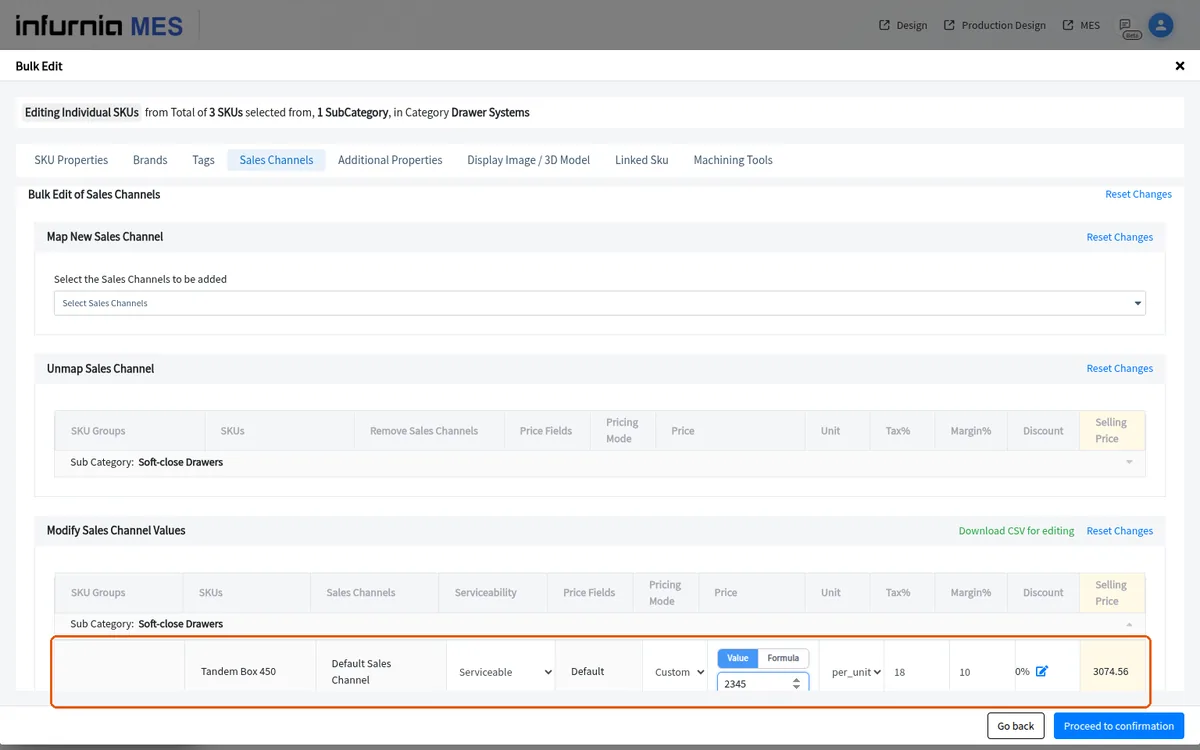
SKU चुनें, individual-SKU mode में Bulk Edit चलाएँ, channel हटाने के लिए Unmap Sales Channel section का उपयोग करें, फिर confirmation और publishing पर आगे बढ़ें।
जिन SKU का कोई sales channel नहीं है और उनके लिए pricing resolve नहीं हो रही है, उसे ठीक करने के लिए SKU को admin catalogue में खोलें, Bulk Edit चलाएँ, sales channel चुनें (उदाहरण के लिए Default), confirmation पर आगे बढ़ें, फिर publish करें और बाहर निकलें; सही किए गए price देखने के लिए बाद में design portal reload करें।
bulk edit publish करने के बाद, cache refresh करें और catalogue screen reload करके confirm करें कि नए price दिख रहे हैं।