Price hardware SKUs and fix unresolved pricing in bulk
Use individual-SKU bulk edit to price hardware items, map a sales channel to unpriced SKUs and confirm the new prices after publishing.
To price a hardware SKU, open it from the hardware category (for example drawer systems), use Edit SKU Properties, then run Bulk Edit in individual-SKU mode: open the SKU's sales channel section, scroll down, change the sales channel value and enter the price, tax and margin for that item before confirming and publishing.
✓ 19 அக்டோபர், 2026 அன்று தயாரிப்பில் சரிபார்க்கப்பட்டது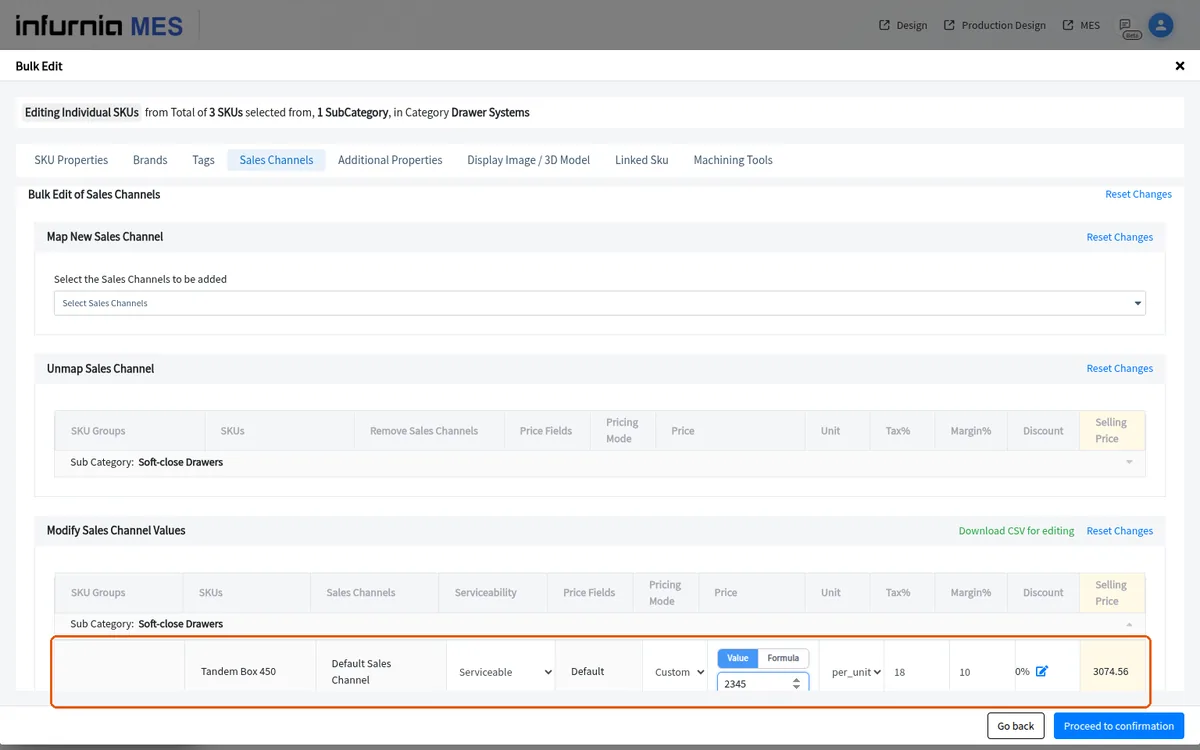
Select the SKUs, run Bulk Edit in individual-SKU mode, use the Unmap Sales Channel section to remove the channel, then proceed to confirmation and publishing.
To fix pricing that does not resolve for SKUs with no sales channel, open the SKUs in the admin catalogue, run Bulk Edit, choose the sales channel (for example Default), proceed to confirmation, then publish and exit; reload the design portal afterwards to see the corrected prices.
After publishing the bulk edit, refresh the cache and reload the catalogue screen to confirm the new prices are reflected.