共享设计并邀请设计师
从 Home 打开 Share Design 以开启设计共享、查看谁有访问权限、通过电子邮件邀请设计师,并从 Version History 管理分支和版本。
设计的 Home > Share 会打开 'Share Design':一个 'Design sharing (common view access)' 开关(Enabled)、People with Access 列表和 Invite。
✓ 已于 2026年10月20日 在产品中核实Invite 会打开 'Invite Designer',其中包含 Email 选择器、Access 选项(Edit)和 Invite 按钮。
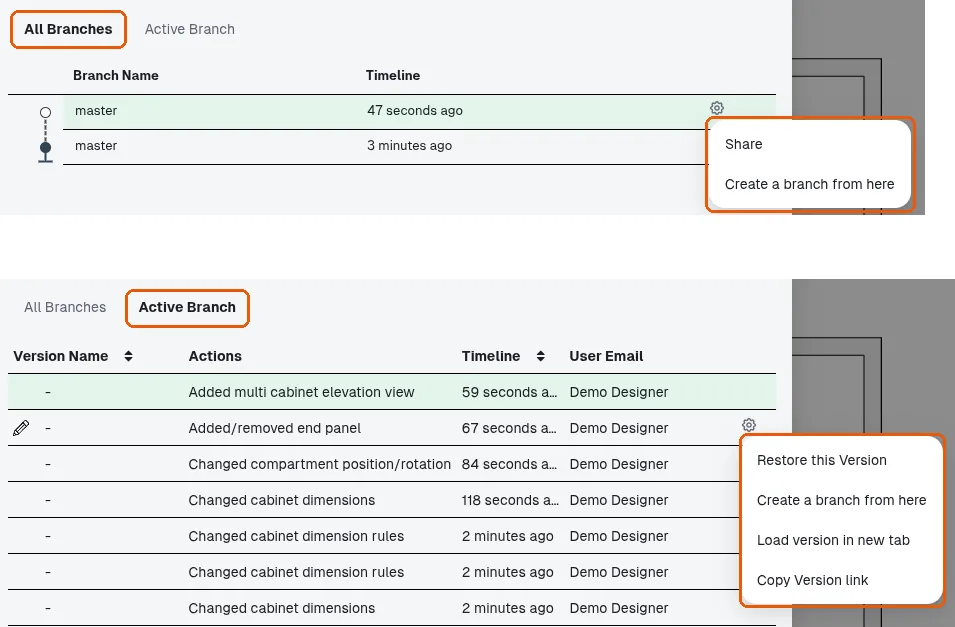
Version History(工具栏的 Branch)有两个标签页:All Branches,其各行的齿轮菜单提供 Share / Create a branch from here;以及 Active Branch,其版本行的齿轮菜单提供 Restore this Version / Create a branch from here / Load version in new tab / Copy Version link。
✓ 已于 2026年10月21日 在产品中核实