Share a design and invite designers
Open Share Design from Home to turn on design sharing, see who has access, invite a designer by email, and manage branches and versions from Version History.
The design's Home > Share opens 'Share Design': a 'Design sharing (common view access)' switch (Enabled), the People with Access list and Invite.
✓ Checked in the product on 20 October 2026Invite opens 'Invite Designer' with an Email picker, an Access choice (Edit) and an Invite button.
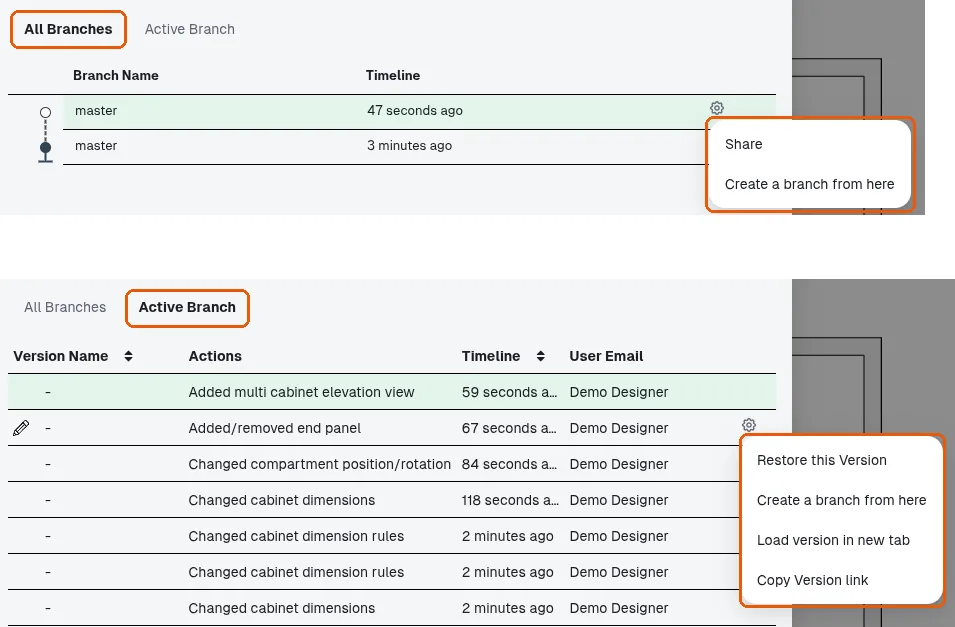
Version History (the toolbar's Branch) has two tabs: All Branches, whose rows' cog menu offers Share / Create a branch from here, and Active Branch, whose version rows' cog menu offers Restore this Version / Create a branch from here / Load version in new tab / Copy Version link.
✓ Checked in the product on 21 October 2026