See an element's properties in the properties panel
Select any element in a design to see its properties in the properties panel, including wall, door and window specifics.
When any element in a design is selected, its properties are shown in the properties panel.
✓ 已于 2026年10月22日 在产品中核实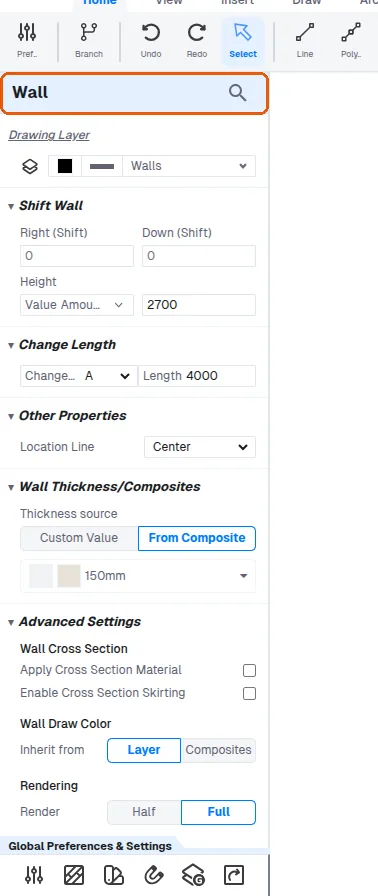
A selected wall's properties show its Height, Right (Shift) and Down (Shift) (which move the wall on the floor plan), Change Length, Location Line and Thickness source.
Doors expose additional properties including opening direction or hinge, flip side and flip hinge.
✓ 已于 2026年10月22日 在产品中核实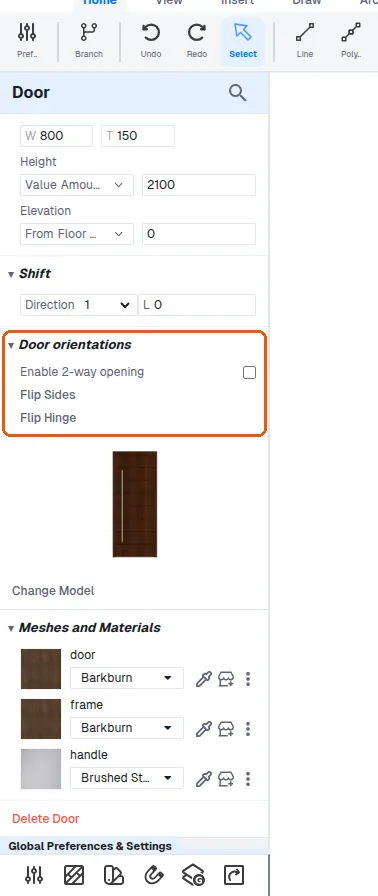
A window's properties show its size (W, T, Height) and where it sits: Elevation (From Floor Base Top), Shift (a Direction and an amount, which moves it along the wall) and Window Location (Center / Left / Right: where the frame sits across the wall's thickness).