Choose what prints as the panel name on labels
Set the panel-name element on a label template so the printed label, preview and machine files show the design name, the custom label or a combined name.
Panel label templates carry a 'Panel Name Reference' choice that controls what the Panel Name field on the label displays: the panel's design name, only the panel's custom label, or a combined label. This suits factories that assign their own custom panel labels in the design and want those (or both) on the fulfillment tag instead of Infurnia's generated names.
This is no longer a live setting on the Settings > Panel Labels page. The label is now a document of individual elements edited in the label editor, and the panel-name reference is applied only when an older template is migrated into that document — so a template keeps whatever name it was migrated with. To change what a template prints, edit the panel-name element in the label editor and save the template.
The name applies wherever the panel name is emitted for that template — the printed label, the on-screen preview, and machine outputs such as the Biesse saw file, which carry the same resolved name. Common confusion: a client renames panels via custom labels but labels still print the original names — the template's panel-name element (or its migrated reference) needs to be set to the custom or combined option, and the template saved. Conversely, if machine files show combined names, the template in use was migrated with the combined option. The name is stored per template, so different templates can present panel names differently; make sure the template actually being printed (org default or the work order's override) is the one that was changed.
The template's panel-name element decides whether the label shows the custom label alone, the design name, or a combined label.
✓ Проверено в продукте 19 октября 2026 г.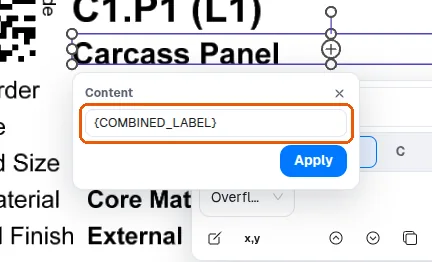
Individual elements on the panel label can be switched on or off in the MES app under Settings > Panel Labels, in the Layers panel, so labels can be made to carry the project or room a panel belongs to (its 'Project Name' and 'Room Name' rows).
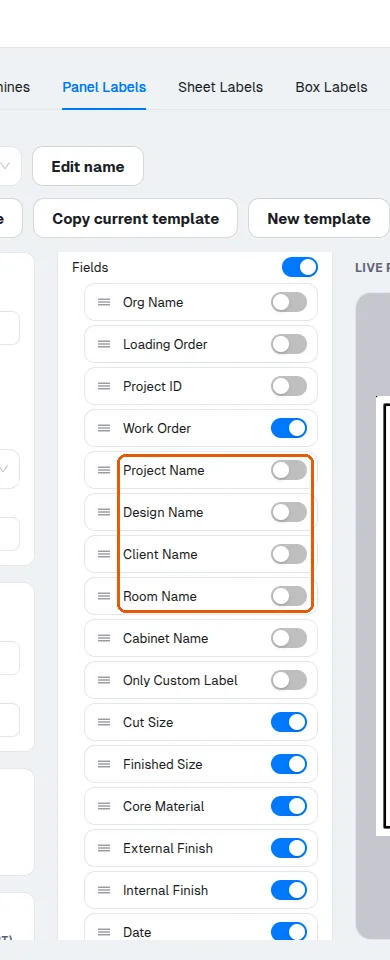
Cabinet Name is one of the optional elements on the panel label template: it can be switched off in the Layers panel so labels print without it.
On the panel label, fields that are not needed can be switched off and the remaining fields arranged so the label reads clearly, and the default Infurnia label already carries part identifiers, cut and finished sizes, material and finish, edge banding and operations.
The custom-label field is optional on the template.
✓ Проверено в продукте 19 октября 2026 г.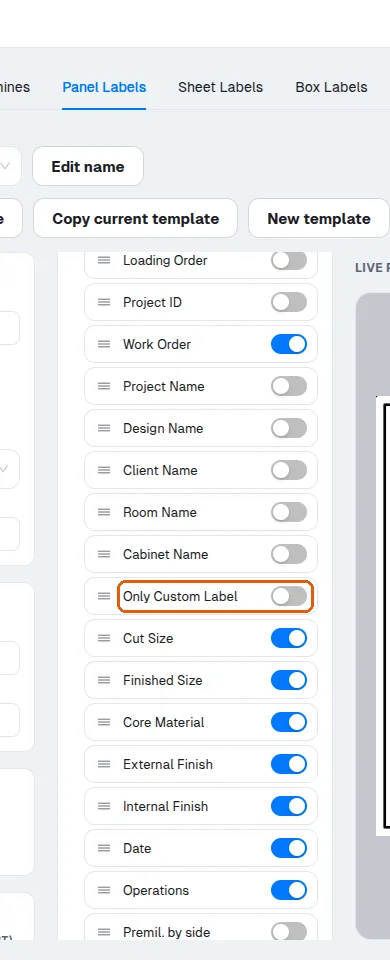
The custom-label field only prints once it has been added to the label's element list.
✓ Проверено в продукте 19 октября 2026 г.The custom-label field must be added to the label's element list (switched on in the label editor) before it appears on the printed sticker.