اختر ما يُطبع كاسم اللوح على الملصقات
اضبط عنصر اسم اللوح في قالب الملصق بحيث يُظهر الملصق المطبوع والمعاينة وملفات الآلة اسم التصميم أو الملصق المخصص أو اسمًا مركبًا.
Panel label templates carry a 'Panel Name Reference' choice that controls what the Panel Name field on the label displays: the panel's design name, only the panel's custom label, or a combined label. This suits factories that assign their own custom panel labels in the design and want those (or both) on the fulfillment tag instead of Infurnia's generated names.
This is no longer a live setting on the Settings > Panel Labels page. The label is now a document of individual elements edited in the label editor, and the panel-name reference is applied only when an older template is migrated into that document — so a template keeps whatever name it was migrated with. To change what a template prints, edit the panel-name element in the label editor and save the template.
The name applies wherever the panel name is emitted for that template — the printed label, the on-screen preview, and machine outputs such as the Biesse saw file, which carry the same resolved name. Common confusion: a client renames panels via custom labels but labels still print the original names — the template's panel-name element (or its migrated reference) needs to be set to the custom or combined option, and the template saved. Conversely, if machine files show combined names, the template in use was migrated with the combined option. The name is stored per template, so different templates can present panel names differently; make sure the template actually being printed (org default or the work order's override) is the one that was changed.
يحدد عنصر اسم اللوح في القالب ما إذا كان الملصق يعرض الملصق المخصص وحده، أو اسم التصميم، أو ملصقًا مركبًا.
✓ تم التحقق منه في المنتج في 19 أكتوبر 2026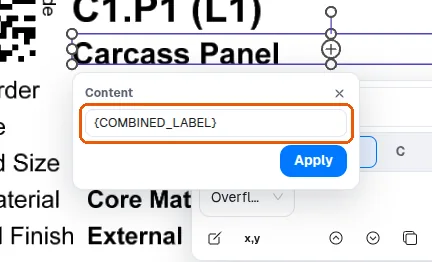
يمكن تشغيل العناصر الفردية على ملصق اللوح أو إيقافها في تطبيق MES ضمن Settings > Panel Labels، في لوحة الطبقات، بحيث يمكن جعل الملصقات تحمل المشروع أو الغرفة التي ينتمي إليها اللوح (صفّا 'Project Name' و'Room Name').
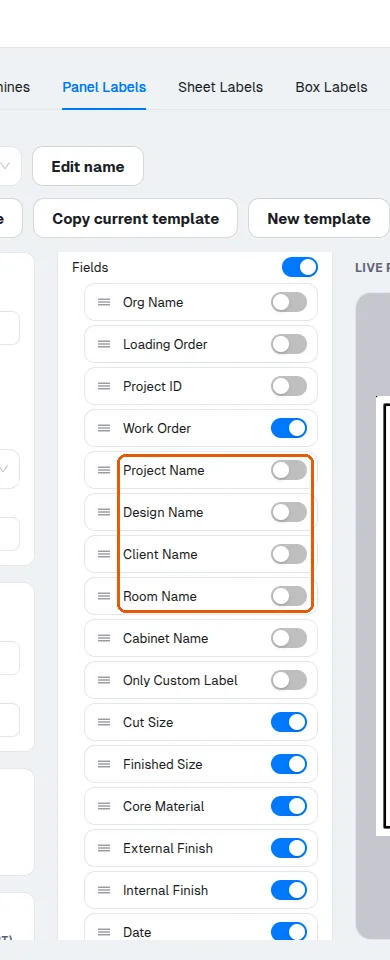
اسم الخزانة أحد العناصر الاختيارية في قالب ملصق اللوح: يمكن إيقافه في لوحة الطبقات لتُطبع الملصقات دونه.
على ملصق اللوح، يمكن إيقاف الحقول غير اللازمة وترتيب الحقول المتبقية ليُقرأ الملصق بوضوح، وملصق Infurnia الافتراضي يحمل أصلًا معرّفات القطع ومقاسات القص والتشطيب والمادة والتشطيب وشريط الحواف والعمليات.
حقل الملصق المخصص اختياري في القالب.
✓ تم التحقق منه في المنتج في 19 أكتوبر 2026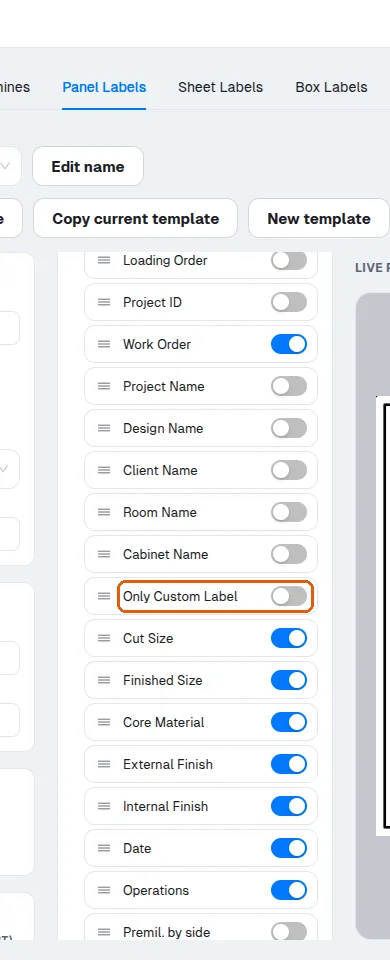
لا يُطبع حقل الملصق المخصص إلا بعد إضافته إلى قائمة عناصر الملصق.
✓ تم التحقق منه في المنتج في 19 أكتوبر 2026يجب إضافة حقل الملصق المخصص إلى قائمة عناصر الملصق (تشغيله في محرر الملصقات) قبل أن يظهر على الملصق المطبوع.