ಲೇಬಲ್ಗಳಲ್ಲಿ panel name ಆಗಿ ಯಾವುದು ಮುದ್ರಣವಾಗುತ್ತದೆ ಎಂಬುದನ್ನು ಆಯ್ಕೆಮಾಡಿ
ಮುದ್ರಿತ ಲೇಬಲ್, ಮುನ್ನೋಟ ಮತ್ತು machine fileಗಳಲ್ಲಿ ವಿನ್ಯಾಸದ ಹೆಸರು, ಕಸ್ಟಮ್ ಲೇಬಲ್ ಅಥವಾ ಸಂಯೋಜಿತ ಹೆಸರು ಕಾಣಿಸುವಂತೆ ಲೇಬಲ್ ಟೆಂಪ್ಲೇಟ್ನಲ್ಲಿ panel-name ಅಂಶವನ್ನು ಹೊಂದಿಸಿ.
Panel label templates carry a 'Panel Name Reference' choice that controls what the Panel Name field on the label displays: the panel's design name, only the panel's custom label, or a combined label. This suits factories that assign their own custom panel labels in the design and want those (or both) on the fulfillment tag instead of Infurnia's generated names.
This is no longer a live setting on the Settings > Panel Labels page. The label is now a document of individual elements edited in the label editor, and the panel-name reference is applied only when an older template is migrated into that document — so a template keeps whatever name it was migrated with. To change what a template prints, edit the panel-name element in the label editor and save the template.
The name applies wherever the panel name is emitted for that template — the printed label, the on-screen preview, and machine outputs such as the Biesse saw file, which carry the same resolved name. Common confusion: a client renames panels via custom labels but labels still print the original names — the template's panel-name element (or its migrated reference) needs to be set to the custom or combined option, and the template saved. Conversely, if machine files show combined names, the template in use was migrated with the combined option. The name is stored per template, so different templates can present panel names differently; make sure the template actually being printed (org default or the work order's override) is the one that was changed.
ಟೆಂಪ್ಲೇಟ್ನ panel-name ಅಂಶವು ಲೇಬಲ್ ಕಸ್ಟಮ್ ಲೇಬಲ್ ಮಾತ್ರ, ವಿನ್ಯಾಸದ ಹೆಸರು, ಅಥವಾ ಸಂಯೋಜಿತ ಲೇಬಲ್ ತೋರಿಸುತ್ತದೆಯೇ ಎಂದು ನಿರ್ಧರಿಸುತ್ತದೆ.
✓ ಅಕ್ಟೋಬರ್ 19, 2026 ರಂದು ಪ್ರಾಡಕ್ಟ್ನಲ್ಲಿ ಪರಿಶೀಲಿಸಲಾಗಿದೆ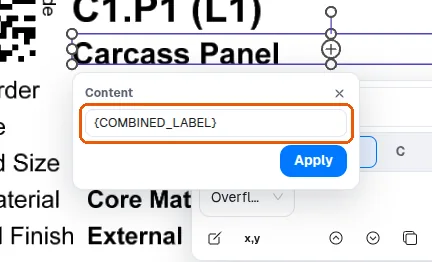
MES ಆ್ಯಪ್ನಲ್ಲಿ Settings > Panel Labels ಅಡಿಯಲ್ಲಿ, Layers ಪ್ಯಾನೆಲ್ನಲ್ಲಿ panel labelನ ಪ್ರತ್ಯೇಕ ಅಂಶಗಳನ್ನು ಆನ್ ಅಥವಾ ಆಫ್ ಮಾಡಬಹುದು, ಹೀಗಾಗಿ panel ಸೇರಿರುವ ಪ್ರಾಜೆಕ್ಟ್ ಅಥವಾ room ಅನ್ನು (ಅದರ 'Project Name' ಮತ್ತು 'Room Name' ಸಾಲುಗಳು) ಲೇಬಲ್ಗಳು ಹೊಂದುವಂತೆ ಮಾಡಬಹುದು.
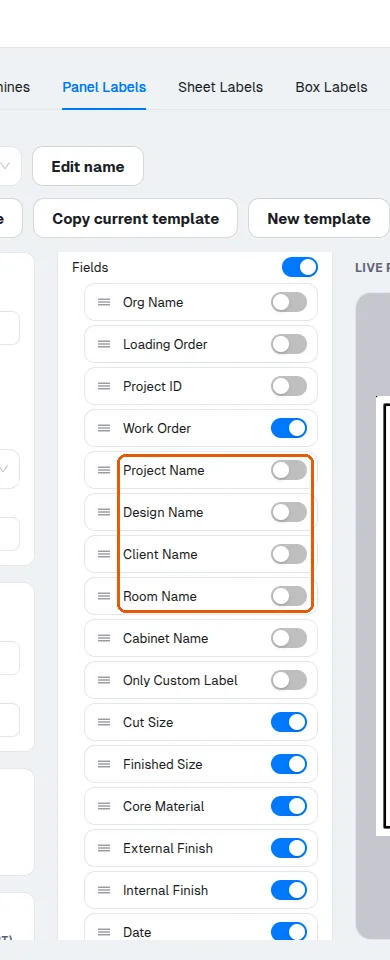
Cabinet Name ಎಂಬುದು panel label ಟೆಂಪ್ಲೇಟ್ನ ಐಚ್ಛಿಕ ಅಂಶಗಳಲ್ಲಿ ಒಂದು: Layers ಪ್ಯಾನೆಲ್ನಲ್ಲಿ ಅದನ್ನು ಆಫ್ ಮಾಡಬಹುದು, ಆಗ ಲೇಬಲ್ಗಳು ಅದಿಲ್ಲದೆ ಮುದ್ರಣವಾಗುತ್ತವೆ.
panel labelನಲ್ಲಿ ಅಗತ್ಯವಿಲ್ಲದ ಕ್ಷೇತ್ರಗಳನ್ನು ಆಫ್ ಮಾಡಬಹುದು ಮತ್ತು ಉಳಿದ ಕ್ಷೇತ್ರಗಳನ್ನು ಸ್ಪಷ್ಟವಾಗಿ ಓದುವಂತೆ ಜೋಡಿಸಬಹುದು; ಡೀಫಾಲ್ಟ್ Infurnia ಲೇಬಲ್ ಈಗಾಗಲೇ part ಗುರುತುಗಳು, cut ಮತ್ತು finished sizeಗಳು, material ಮತ್ತು finish, edge banding ಮತ್ತು operationಗಳನ್ನು ಹೊಂದಿದೆ.
ಕಸ್ಟಮ್-ಲೇಬಲ್ ಕ್ಷೇತ್ರವು ಟೆಂಪ್ಲೇಟ್ನಲ್ಲಿ ಐಚ್ಛಿಕ.
✓ ಅಕ್ಟೋಬರ್ 19, 2026 ರಂದು ಪ್ರಾಡಕ್ಟ್ನಲ್ಲಿ ಪರಿಶೀಲಿಸಲಾಗಿದೆ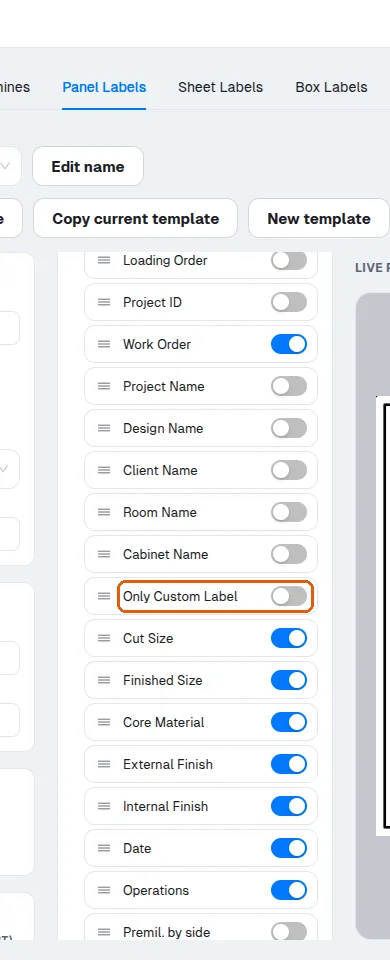
ಕಸ್ಟಮ್-ಲೇಬಲ್ ಕ್ಷೇತ್ರವನ್ನು ಲೇಬಲ್ನ ಅಂಶಗಳ ಪಟ್ಟಿಗೆ ಸೇರಿಸಿದ ನಂತರವೇ ಅದು ಮುದ್ರಣವಾಗುತ್ತದೆ.
✓ ಅಕ್ಟೋಬರ್ 19, 2026 ರಂದು ಪ್ರಾಡಕ್ಟ್ನಲ್ಲಿ ಪರಿಶೀಲಿಸಲಾಗಿದೆಮುದ್ರಿತ ಸ್ಟಿಕ್ಕರ್ನಲ್ಲಿ ಕಾಣಿಸುವ ಮೊದಲು ಕಸ್ಟಮ್-ಲೇಬಲ್ ಕ್ಷೇತ್ರವನ್ನು ಲೇಬಲ್ನ ಅಂಶಗಳ ಪಟ್ಟಿಗೆ ಸೇರಿಸಬೇಕು (ಲೇಬಲ್ ಎಡಿಟರ್ನಲ್ಲಿ ಆನ್ ಮಾಡಬೇಕು).