Track panels manually from the Manual table
Open the Manual table, pick a published work order and track the panels you need at the station.
Manual tracking is the fallback when a panel's QR/barcode cannot be scanned (e.g. a scratched label).
Manual tracking is retained as a fallback for sites without a scanner or Android device.
From the Tracking page, 'Manual' opens a table where the operator picks a work order, selects panels by checkbox (with filters for core, finishes, edge bands and operations) and hits Track; a confirmation ('Track N panel(s) at <station>? This marks them completed for this station.') comes before anything is recorded. It gives the count and the station, not the list of panels.
The work-order dropdown only lists work orders that have been published for production — an unpublished work order is invisible here, which is the usual cause of 'my work order is missing'.
✓ 2026년 10월 20일에 제품에서 확인됨The table hides panels already tracked at the currently selected station, so 'panels missing from the manual list' usually means they were already tracked there — check Tracking History.
✓ 2026년 10월 20일에 제품에서 확인됨The operator can find the panel by its panel ID or pick it from the panel list instead of scanning.
✓ 2026년 10월 20일에 제품에서 확인됨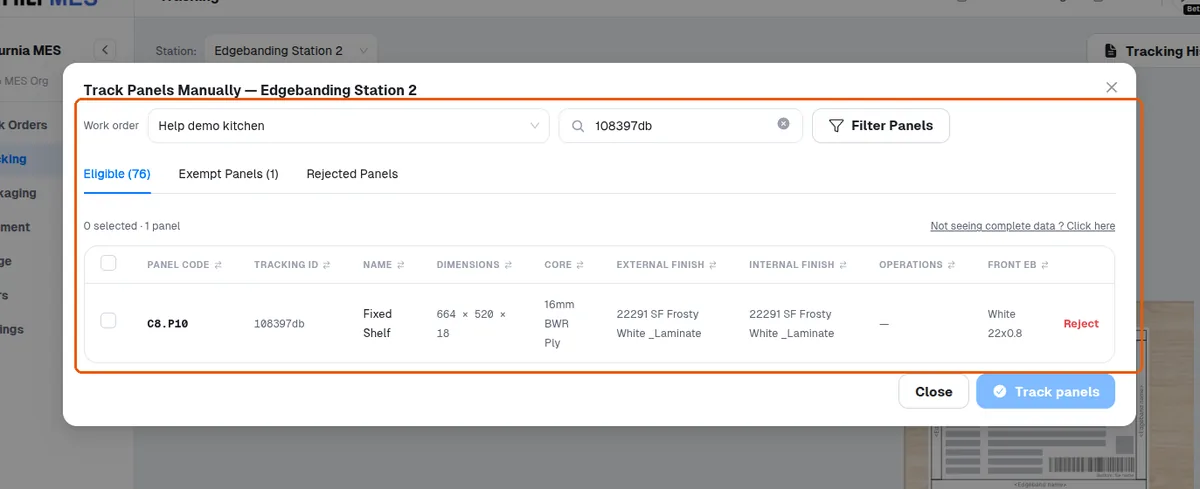
If panel data looks incomplete or stale in the table, look for the refresh/resync option for that work order to pull the latest published panel and hardware data.