tracking station ಅನ್ನು ಅಳಿಸುವ ಬದಲು ಅದನ್ನು ಆಫ್ ಮಾಡಿ
Settings > Configure stations ನಲ್ಲಿ tracking station ಅನ್ನು ಆಫ್ ಮಾಡಿ, ಇದರಿಂದ ಅದು operator's station selector ನಿಂದ ಹೊರಗುಳಿಯುತ್ತದೆ, ಆದರೆ ಅದರ tracked panels ತಮ್ಮ history ಉಳಿಸಿಕೊಳ್ಳುತ್ತವೆ.
tracking stations ಗೆ delete option ಇಲ್ಲ, Settings > Tracking Stations ನಲ್ಲಿ on/off (active) toggle ಮಾತ್ರ ಇದೆ; ಪ್ರತಿ station ನ status badge ಸ್ಥಿತಿಯನ್ನು ತೋರಿಸುತ್ತದೆ: Active (ಹಸಿರು ಚುಕ್ಕೆ) ಅಥವಾ Inactive (ಬೂದು ಚುಕ್ಕೆ).
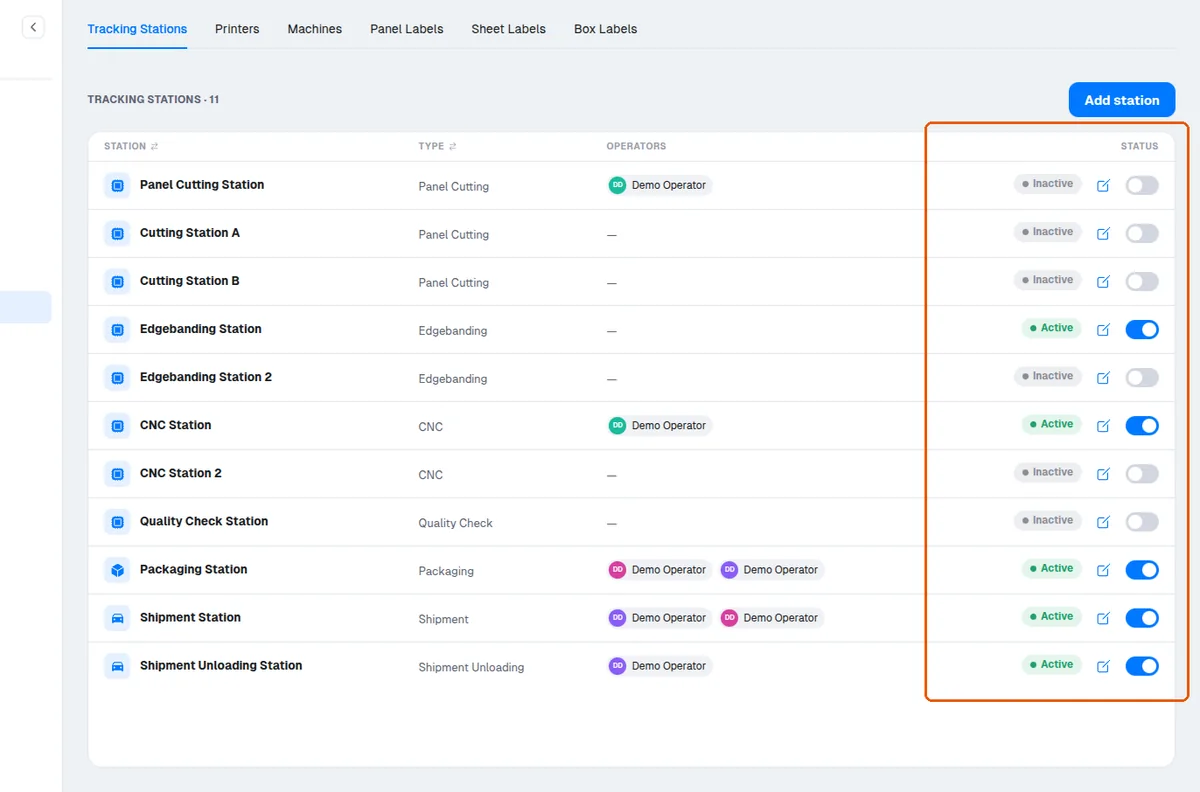
station ಅನ್ನು ಆಫ್ ಮಾಡಿದರೆ ಅದು Tracking page ನಲ್ಲಿ operator's station selector ನಿಂದ ಕಣ್ಮರೆಯಾಗುತ್ತದೆ.
✓ ಅಕ್ಟೋಬರ್ 20, 2026 ರಂದು ಪ್ರಾಡಕ್ಟ್ನಲ್ಲಿ ಪರಿಶೀಲಿಸಲಾಗಿದೆಆಫ್ ಮಾಡಿದ station ಅನ್ನು ಉಲ್ಲೇಖಿಸುವ ಯಾವುದೇ tracking, packaging, ಅಥವಾ shipment loading/unloading ಪ್ರಯತ್ನವನ್ನು server station-inactive error ನೊಂದಿಗೆ ತಿರಸ್ಕರಿಸುತ್ತದೆ.
✓ ಅಕ್ಟೋಬರ್ 10, 2026 ರಂದು ಪ್ರಾಡಕ್ಟ್ನಲ್ಲಿ ಪರಿಶೀಲಿಸಲಾಗಿದೆಆಫ್ ಮಾಡಿದ station ನಲ್ಲಿ ಈಗಾಗಲೇ tracked panels ತಮ್ಮ history ಉಳಿಸಿಕೊಳ್ಳುತ್ತವೆ, ಅದು ಇನ್ನೂ order progress ಗೆ ಎಣಿಕೆಯಾಗುತ್ತದೆ.
✓ ಅಕ್ಟೋಬರ್ 20, 2026 ರಂದು ಪ್ರಾಡಕ್ಟ್ನಲ್ಲಿ ಪರಿಶೀಲಿಸಲಾಗಿದೆorder progress ಅನ್ನು ಪ್ರತಿ station type ಗೆ ಲೆಕ್ಕಹಾಕಲಾಗುತ್ತದೆ, ಮತ್ತು ಕನಿಷ್ಠ ಒಂದು active station ಇರುವ types ಮಾತ್ರ ಸೇರಿಸಲಾಗುತ್ತವೆ.
✓ ಅಕ್ಟೋಬರ್ 20, 2026 ರಂದು ಪ್ರಾಡಕ್ಟ್ನಲ್ಲಿ ಪರಿಶೀಲಿಸಲಾಗಿದೆpanels ಅನ್ನು station type ನಿಂದ exempt ಮಾಡಿದಾಗ, exempt panels ಆ stage ನ required count ನಿಂದ ತೆಗೆದುಹಾಕಲಾಗುತ್ತವೆ, ಮತ್ತು ಎಲ್ಲಾ panels exempt ಆಗಿರುವ stage ಸಂಪೂರ್ಣ ಪೂರ್ಣಗೊಂಡಂತೆ ಎಣಿಕೆಯಾಗುತ್ತದೆ.