Switch off a tracking station instead of deleting it
Turn a tracking station off in Settings > Configure stations so it leaves the operator's station selector while its tracked panels keep their history.
There is no delete option for tracking stations, only the on/off (active) toggle in Settings > Tracking Stations; each station's status badge shows the state: Active (green dot) or Inactive (grey dot).
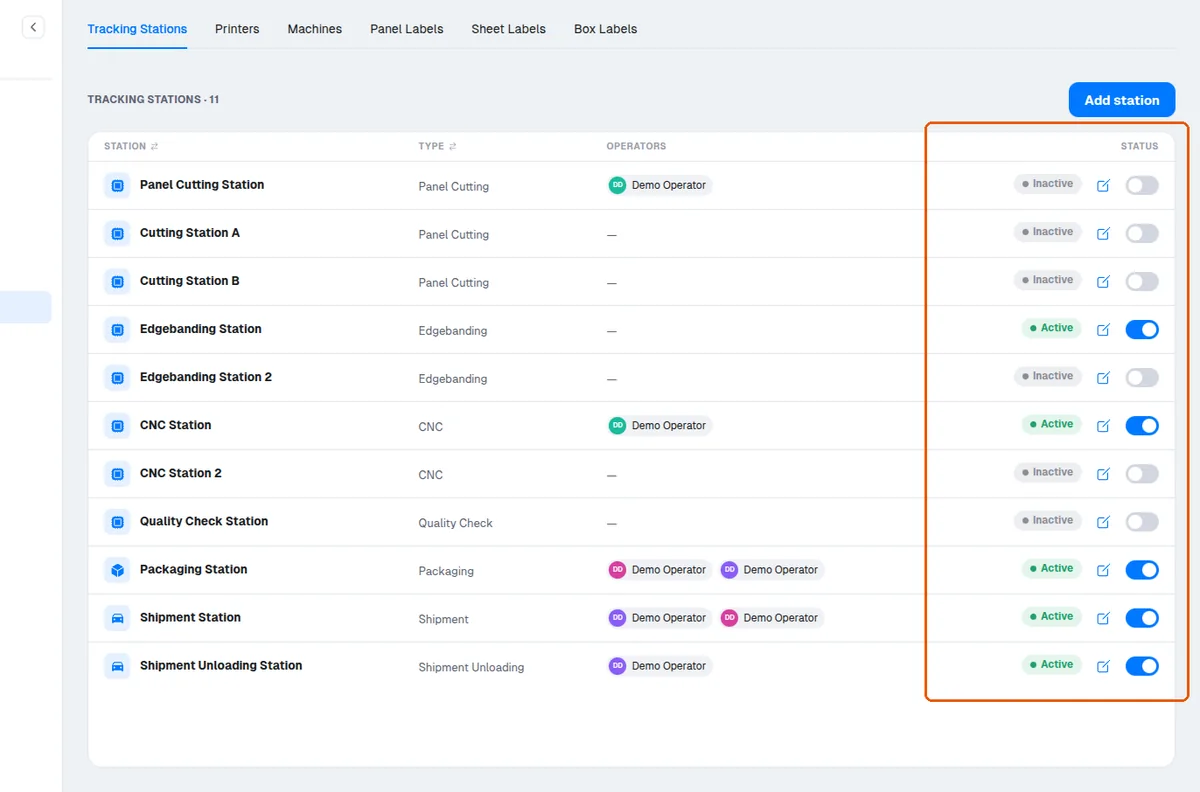
Switching a station off has the effect that it disappears from the operator's station selector on the Tracking page.
✓ Checked in the product on 20 October 2026Any tracking, packaging, or shipment loading/unloading attempt that references a station that is switched off is rejected by the server with a station-inactive error.
✓ Checked in the product on 10 October 2026Panels already tracked at a station that is switched off keep their history, which still counts toward order progress.
✓ Checked in the product on 20 October 2026Order progress is computed per station type, and only types that still have at least one active station are included.
✓ Checked in the product on 20 October 2026When panels are exempted from a station type, exempt panels are removed from that stage's required count, and a stage where every panel is exempt counts as fully complete.