Lock a partition section and set its height
Switch a partition section to fixed, give it exact dimensions and add fixed shelves at that level.
A partition section can be locked by switching it to fixed.
✓ 2026年10月10日に製品で確認済みOnce fixed, the partition can be given specific dimensions.
✓ 2026年10月10日に製品で確認済みOnce fixed, fixed shelves can be added at that partition level with a defined height.
✓ 2026年10月10日に製品で確認済みTo set an exact partition height, select the partition level, click 'Switch to Fixed Height' (the current height mode shows Auto until then), type the value and apply; the partition takes that height.
✓ 2026年10月22日に製品で確認済み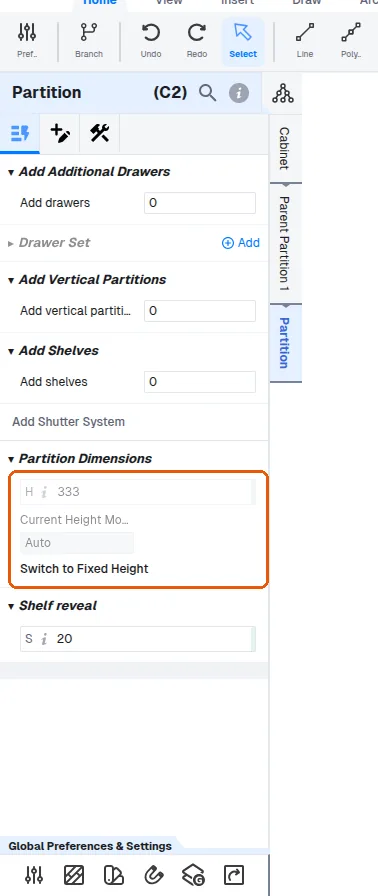
The remaining space is absorbed by the auto sections.
✓ 2026年10月10日に製品で確認済みPartitions can also be added at partition level.
✓ 2026年10月10日に製品で確認済みShelves are added at partition level.
✓ 2026年10月10日に製品で確認済みShelves can then be set as fixed or adjustable at panel level.
✓ 2026年10月10日に製品で確認済みTo control the vertical spacing between shelves, select the space between two panels (for example the top panel and the first shelf) and set that section's partition height to the desired value; repeat this for each section, setting each partition height individually.
✓ 2026年10月10日に製品で確認済み