Override layer line styles in a view's View Specific Layers
Set a layer's Line Color, Line Type and Line Thickness for one view with its pencil, and see which layers are Overridden.
In a view's View Specific Layers, each layer row has a visibility icon and a pencil.
✓ 22 اکتوبر، 2026 کو پروڈکٹ میں جانچا گیا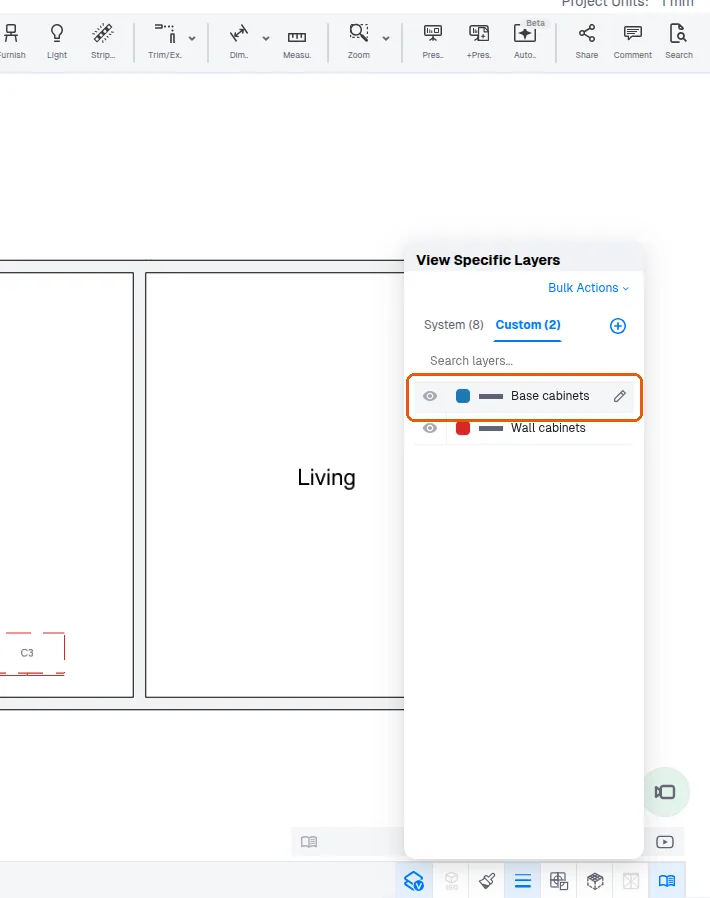
The pencil sets that layer's Line Color, Line Type and Line Thickness for the view.
✓ 22 اکتوبر، 2026 کو پروڈکٹ میں جانچا گیا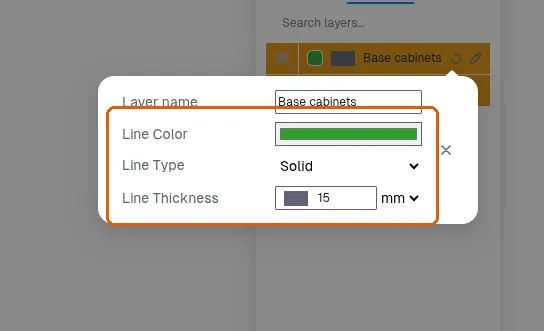
A layer changed in the view is marked Overridden with a reset icon on its row.
✓ 22 اکتوبر، 2026 کو پروڈکٹ میں جانچا گیاIn a view's View Specific Layers, the System tab gains a Dimensions row once a dimension is drawn in the design.
✓ 22 اکتوبر، 2026 کو پروڈکٹ میں جانچا گیاIn View Specific Layers, a layer's pencil pop-over applies its edits to the view when Enter is pressed in its Line Thickness field.
✓ 22 اکتوبر، 2026 کو پروڈکٹ میں جانچا گیا