Set machine grooving preferences for back-panel grooves
Choose the operation type and preferred tools that decide how each machine cuts back-panel grooves.
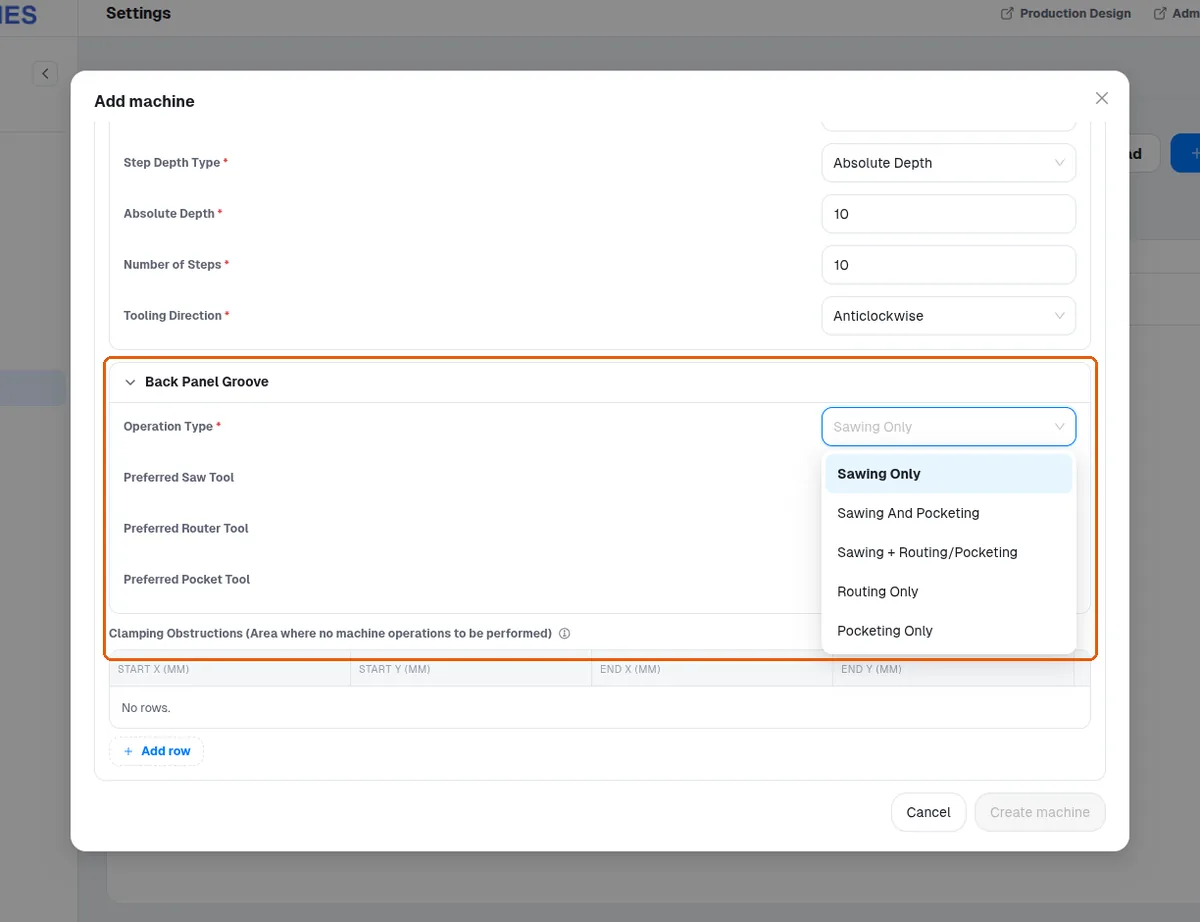
Each machine's grooving preferences (Settings > Machines > the machine > Back Panel Groove: Operation Type — Sawing Only, Sawing And Pocketing, Sawing + Routing/Pocketing, Routing Only, Pocketing Only — and Preferred Saw / Router / Pocket Tool) select the method and the tool for back-panel grooving, so the same design can legitimately produce different groove programs on different machines. With no preferred router, routing uses the machine's router whose diameter matches the groove width (an 8 mm groove: the 8 mm router). A Preferred Router Tool no wider than the groove is used instead (a 6 mm router for an 8 mm groove); one wider than the groove is not used (with a 10 mm router preferred, an 8 mm groove is still routed with the 8 mm router). A new machine of every post-processor (Generic MPR, Homag MPR, Biesse CIX, Felder TCN, SCM XCS) starts at Sawing Only with no preferred tools.
When no preferred router tool is set on a machine, routing falls back to a default routing tool for the operation — the machine's router whose diameter matches the groove width.