Check per-panel station status on Order Progress
Open the Order Progress tab to see each panel turn green as it passes each station.
The per-panel status across the stations is visible on the work order's Order Progress tab (Work Orders > a work order > Order Progress): one column per station type (Panel Cutting, Edgebanding, CNC, Packaging, Loaded, Unloaded), where each panel's mark turns green once it has passed that station.
✓ ଅକ୍ଟୋବର 19, 2026 ରେ ପ୍ରଡକ୍ଟରେ ଯାଞ୍ଚ କରାଯାଇଛି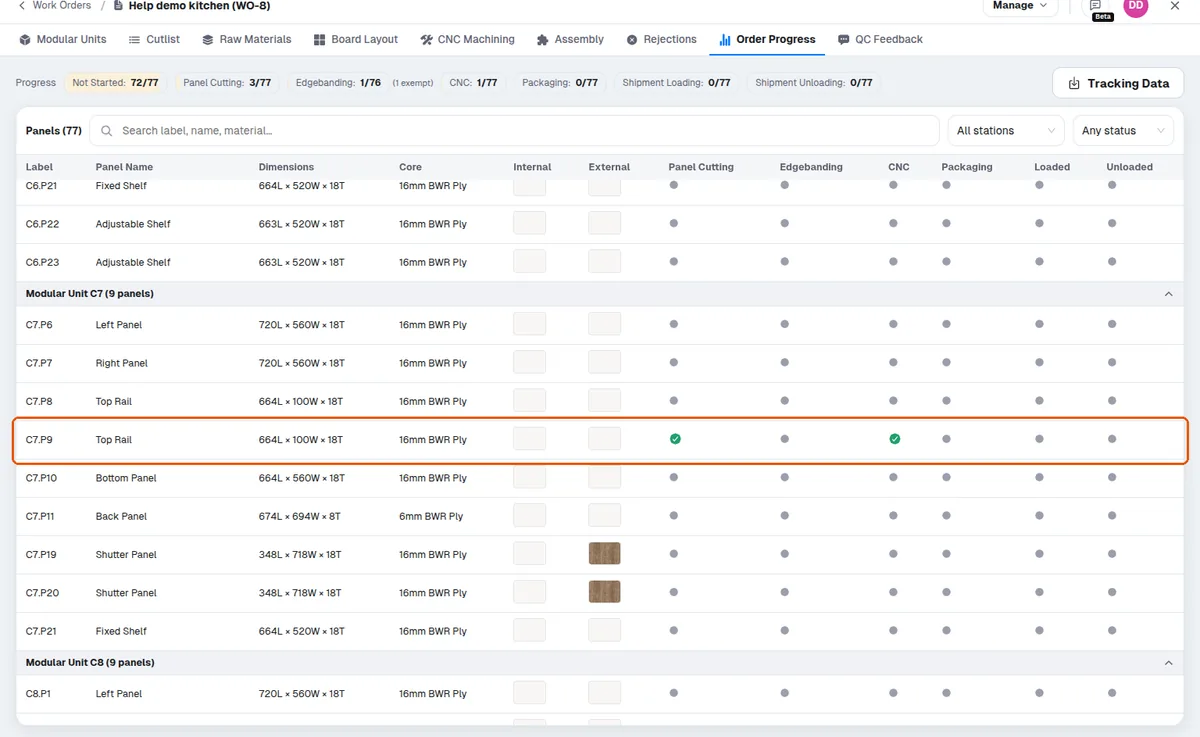
Scanning a panel label marks the per-panel stages (Panel Cutting, Edgebanding, CNC, and the other scan-based stations) as done.
✓ ଅକ୍ଟୋବର 20, 2026 ରେ ପ୍ରଡକ୍ଟରେ ଯାଞ୍ଚ କରାଯାଇଛି