Choose the optimisation criterion per sheet type
Pick a criterion for each sheet type, or apply one to all with the Overall row, then continue without recomputing.
The recommended cell - the one with the fewest sheets - is preselected per row.
✓ 2026 ഒക്ടോബർ 11-ന് പ്രോഡക്റ്റിൽ പരിശോധിച്ചുThe user can pick a different criterion independently for each sheet type.
✓ 2026 ഒക്ടോബർ 11-ന് പ്രോഡക്റ്റിൽ പരിശോധിച്ചുThe user can use the 'Overall' row to apply one criterion to all sheet types at once (it shows 'Mixed' while the sheet types differ).
A 'System Recommendation' button restores the recommended criterion for every row.
When composite sheets are in play the choice is Overall-only: the per-sheet-type cells become read-only and the criterion is picked once for all sheet types, with the recommended column marked in the Overall row.
✓ 2026 ഒക്ടോബർ 19-ന് പ്രോഡക്റ്റിൽ പരിശോധിച്ചു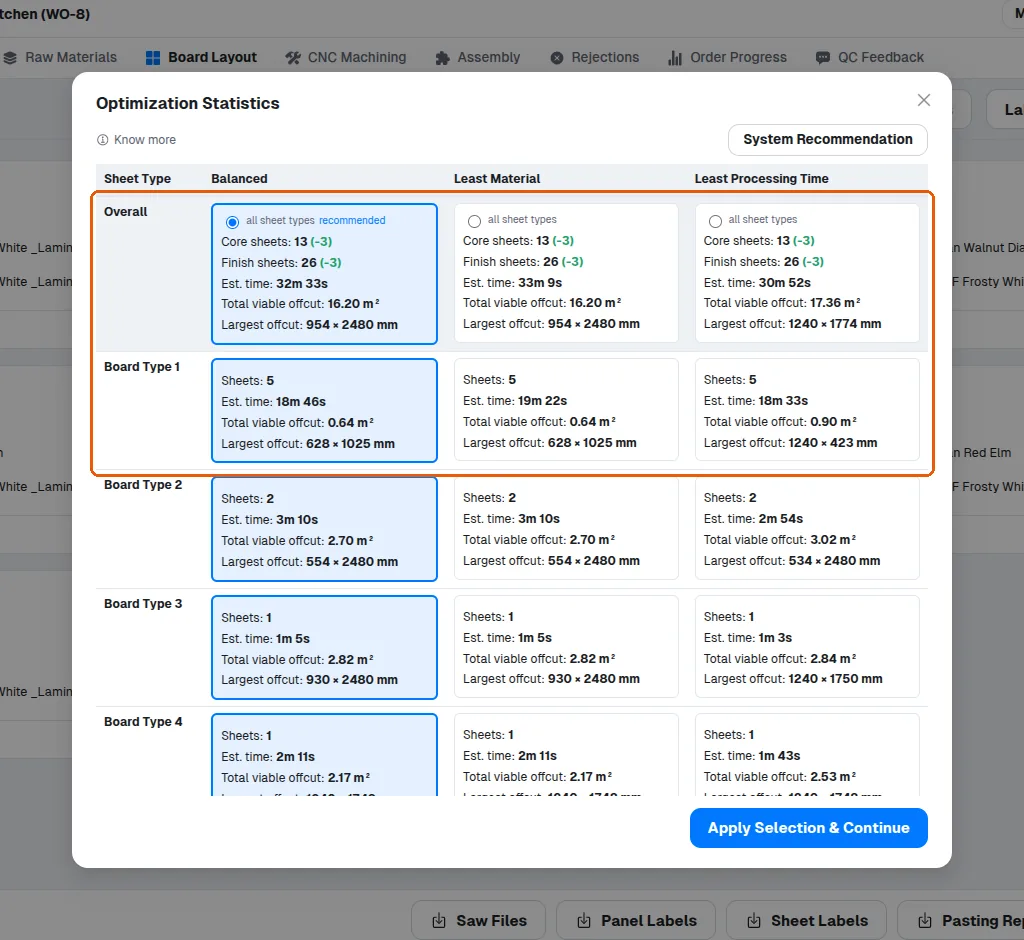
Clicking 'Apply Selection & Continue' reuses the already-computed layouts, so nothing is recomputed.