Set a custom drawer depth with a channel fitted
Use the Depth Reduction in the drawer's Other Parameters to make a drawer shallower than the cabinet while a channel stays fitted.
The Depth Reduction value is entered in the drawer's Other Parameters at drawer level.
✓ 2026년 10월 18일에 제품에서 확인됨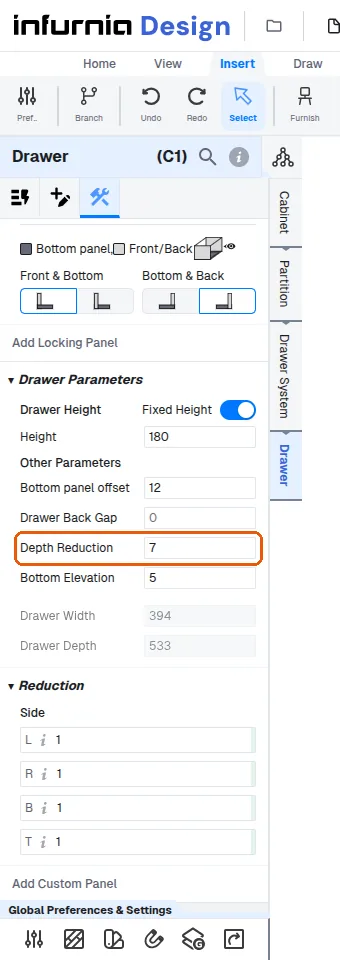
The resulting Drawer Depth is shown read-only in the drawer panel.
✓ 2026년 10월 18일에 제품에서 확인됨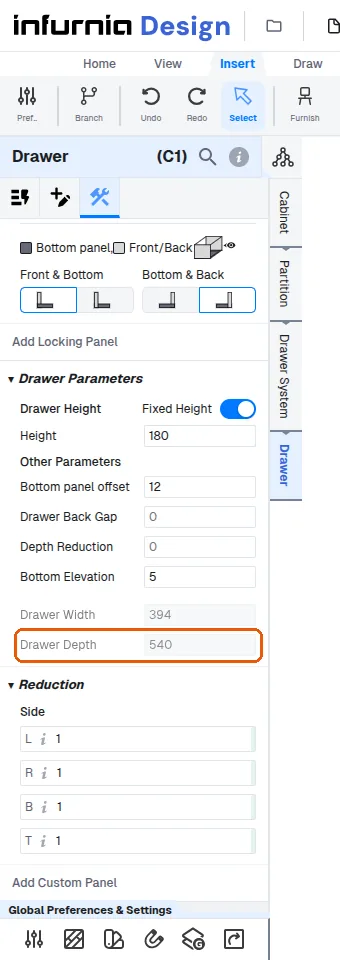
To make a drawer shallower than the cabinet, enter the amount to remove from the back (e.g. 60 for a 410 cabinet depth giving a 350 drawer) and fine-tune the value until the displayed drawer depth is correct.
To set a custom drawer depth while a channel is fitted, change the Depth Reduction in the drawer's Other Parameters: it stays editable with the channel on, and the drawer depth becomes the channel depth minus it. The channel does not have to come off first; a Depth Reduction set while no channel is fitted is kept when the channel is added again.
✓ 2026년 10월 18일에 제품에서 확인됨