Exclude element types and layers from auto dimensioning
Control which elements get dimensioned through the design's elevation preferences and drawing layers.
Specific element types can be excluded through the design's elevation preferences ('remove from auto dimensioning'), so if doors or windows are not being dimensioned, check that setting first.
✓ 2026년 10월 20일에 제품에서 확인됨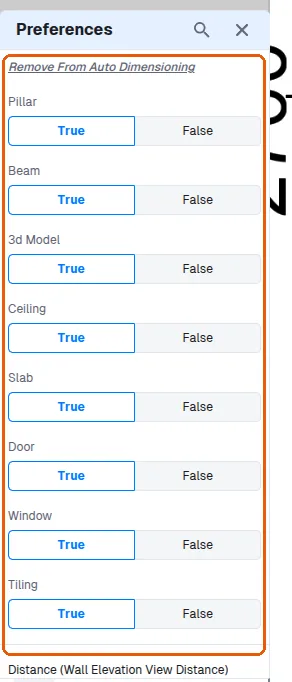
The exclusion list is stored in the design's elevation preferences, so the choice applies to the design's auto-dimensioning rather than being set per sheet.
✓ 2026년 10월 20일에 제품에서 확인됨Only elements on visible drawing layers are dimensioned - items on hidden layers are skipped.
✓ 2026년 10월 20일에 제품에서 확인됨If the layer of the dimensioned object itself is turned off in a view, the object is hidden and its dimensions are not visible either.
✓ 2026년 10월 20일에 제품에서 확인됨