Combined Label ಮತ್ತು room name ಕಾಲಂಗಳನ್ನು ಸೇರಿಸಿ
Combined Label ಮತ್ತು room name ಕಾಲಂಗಳನ್ನು ಆನ್ ಮಾಡಿ ಮತ್ತು room name ಅನ್ನು cutlist ನ top ಗೆ ಸರಿಸಿ.
Cutlist Settings ನಲ್ಲಿ ಲಭ್ಯವಿರುವ ಕಾಲಂಗಳಲ್ಲಿ Combined Label ಒಂದಾಗಿದೆ, ಇದು ರಫ್ತಾದ cutlist ಡೇಟಾದಲ್ಲಿ panel ಗಳನ್ನು ಸಂಯೋಜಿತ ಮಟ್ಟದಲ್ಲಿ ಗುರುತಿಸುತ್ತದೆ.
✓ ಅಕ್ಟೋಬರ್ 19, 2026 ರಂದು ಪ್ರಾಡಕ್ಟ್ನಲ್ಲಿ ಪರಿಶೀಲಿಸಲಾಗಿದೆ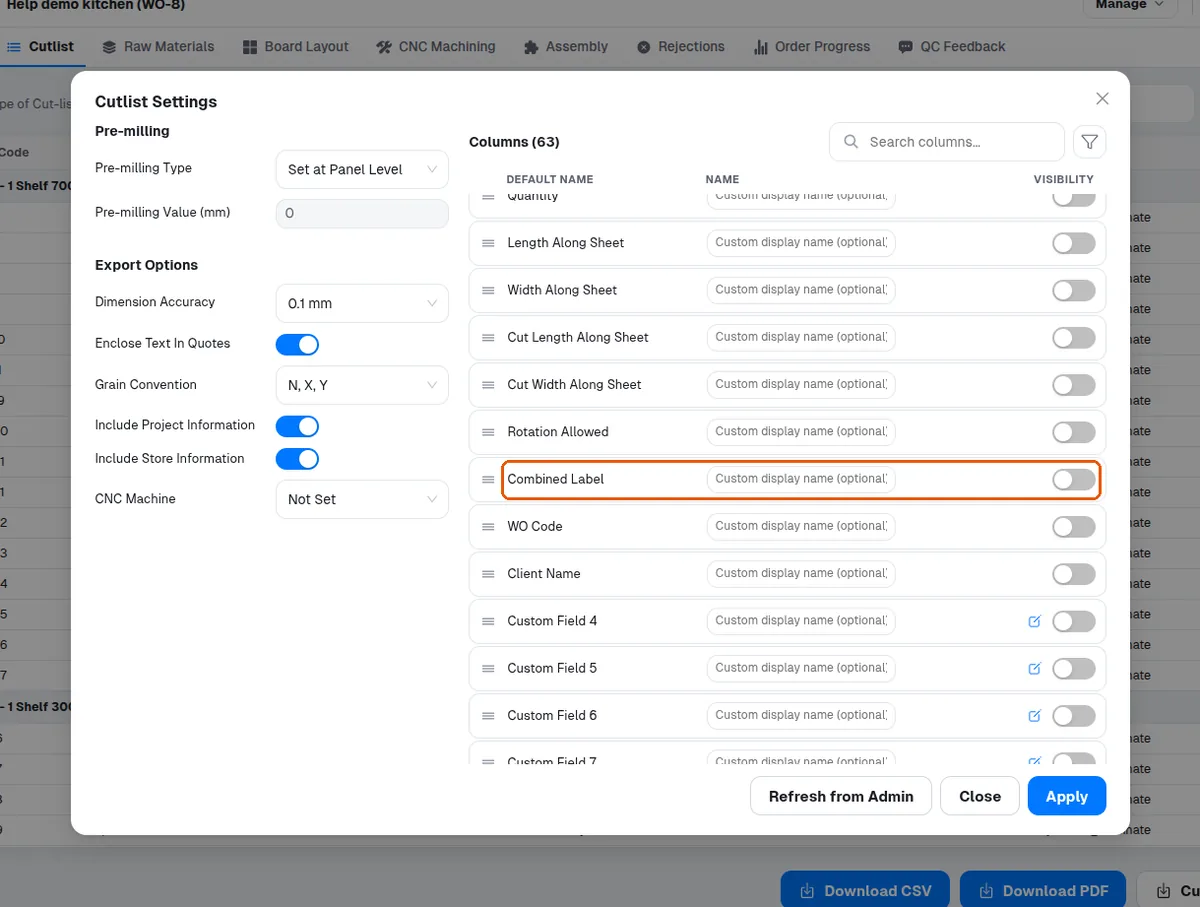
room name ಕಾಲಂ ಎಂಬುದು cutlist field settings ನಲ್ಲಿ ಲಭ್ಯವಿರುವ ಕ್ಷೇತ್ರಗಳಲ್ಲಿ ಒಂದಾಗಿದೆ.
✓ ಅಕ್ಟೋಬರ್ 19, 2026 ರಂದು ಪ್ರಾಡಕ್ಟ್ನಲ್ಲಿ ಪರಿಶೀಲಿಸಲಾಗಿದೆ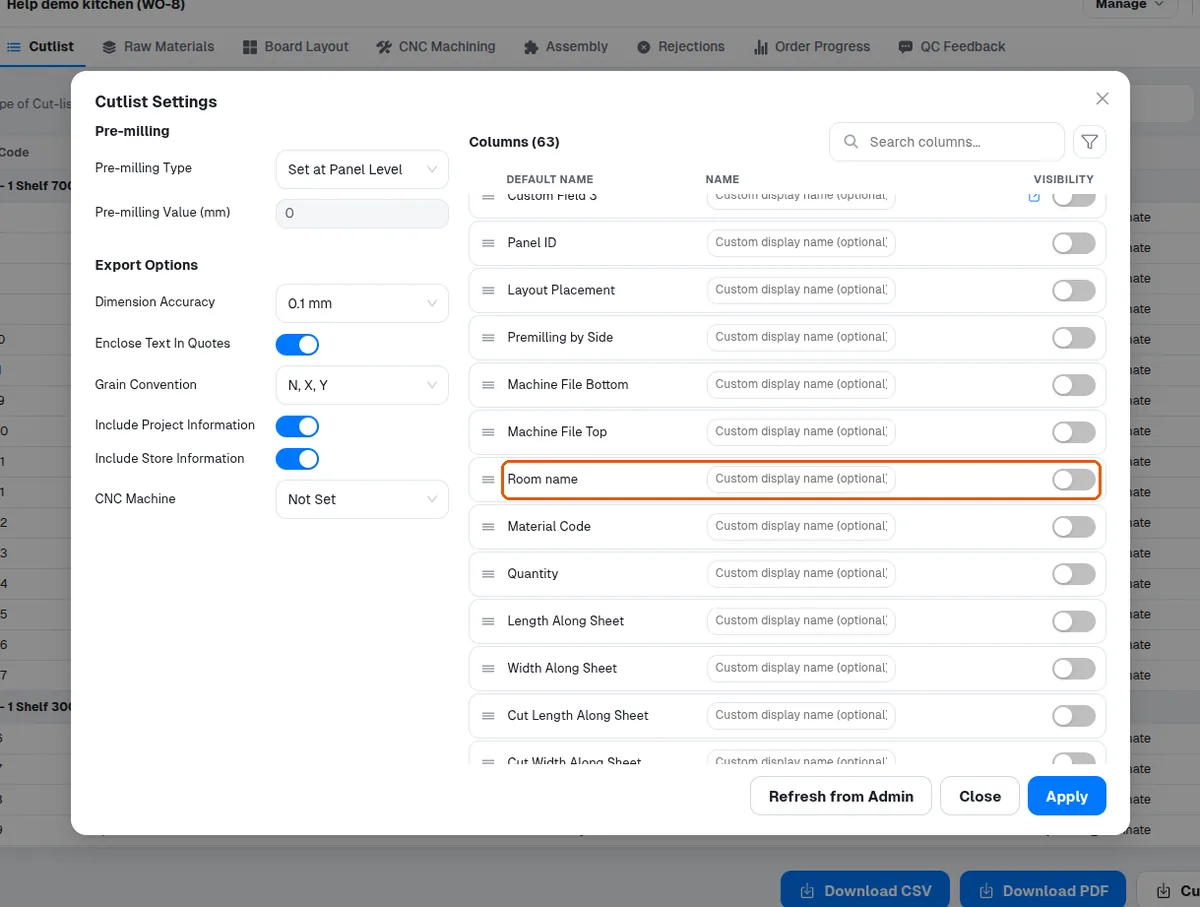
cutlist field settings ನಲ್ಲಿ room name ಕಾಲಂ ಆನ್ ಮಾಡಿ ಮತ್ತು ಪ್ರತಿ ಘಟಕದ room name ಅನ್ನು cut list ನಲ್ಲಿ ತೋರಿಸಲು submit ಮಾಡಿ.
✓ ಅಕ್ಟೋಬರ್ 19, 2026 ರಂದು ಪ್ರಾಡಕ್ಟ್ನಲ್ಲಿ ಪರಿಶೀಲಿಸಲಾಗಿದೆ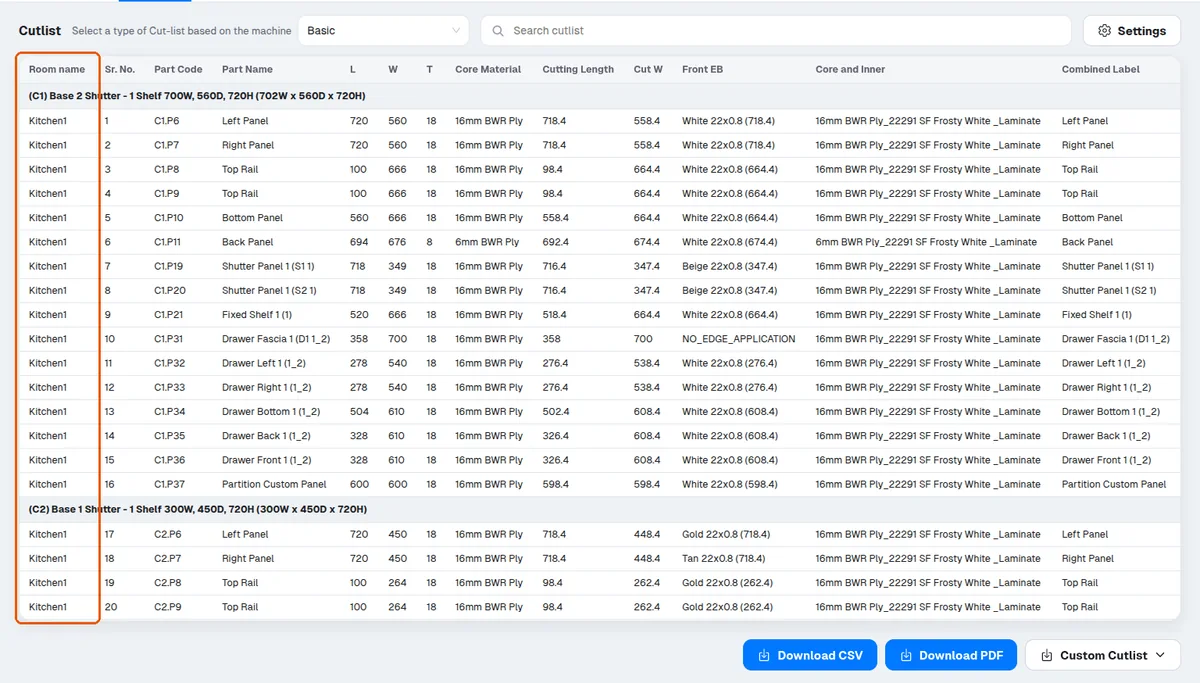
ಕ್ಷೇತ್ರವನ್ನು ಸರಿಸಲು ಅದರ ಪಕ್ಕದಲ್ಲಿರುವ handle ಎಳೆಯಿರಿ (ಉದಾಹರಣೆಗೆ, room name ಅನ್ನು top ಗೆ).
✓ ಅಕ್ಟೋಬರ್ 19, 2026 ರಂದು ಪ್ರಾಡಕ್ಟ್ನಲ್ಲಿ ಪರಿಶೀಲಿಸಲಾಗಿದೆ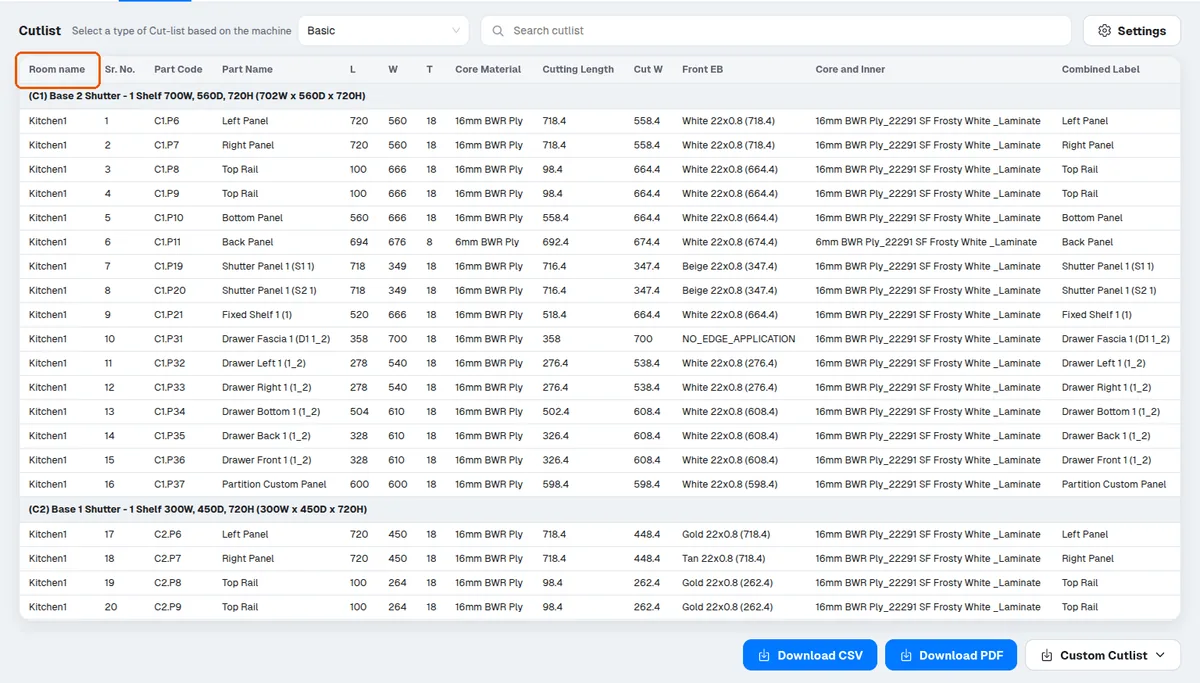
Biesse cutlist ಪ್ರಕಾರವನ್ನು ಆಯ್ಕೆ ಮಾಡಿದಾಗ, Cutlist Settings ಡೈಲಾಗ್ನ Biesse ಟ್ಯಾಬ್ 'Apply Recommended' ಅನ್ನು ತೋರಿಸುತ್ತದೆ. ಇದು Biesse cutlist ಅನ್ನು Infurnia ನ 16-ಕಾಲಂ ಪ್ರಮಾಣಿತಕ್ಕೆ ಮರುಹೊಂದಿಸುತ್ತದೆ - Panel_Label, Panel_ID, Qty, Material_Code, L, W, T, Grain, EB_L, EB_R, EB_T, EB_B, Premilling, CNC_Top, Work_Order, Client - ಮತ್ತು dimension accuracy ಅನ್ನು 1 mm ಗೆ ಹೊಂದಿಸುತ್ತದೆ, quotes ಮತ್ತು project/store info ಆಫ್ ಆಗಿರುತ್ತದೆ. Biesse setup bundle ನ import rules ಇದೇ ವಿನ್ಯಾಸದ ಸುತ್ತ ನಿರ್ಮಿಸಲಾಗಿದೆ, ಆದ್ದರಿಂದ ಇದು ಯಾವುದೇ bNest ಗ್ರಾಹಕರಿಗೆ ಶಿಫಾರಸು ಮಾಡಿದ ಮೊದಲ ಹಂತವಾಗಿದೆ. ಇದು ವಿನಾಶಕಾರಿ: ಗ್ರಾಹಕರ ಪ್ರಸ್ತುತ Biesse ಕಾಲಂ ಸಂರಚನೆ (ಹೆಸರುಗಳು, ಕ್ರಮ, ಹೆಚ್ಚುವರಿ ಕಾಲಂಗಳು) ಬದಲಾಗುತ್ತದೆ, ಆದ್ದರಿಂದ ಇದು ಅಪಾಯದ ದೃಢೀಕರಣದ ಹಿಂದೆ ಇದೆ. Cabinet Code, Panel Name ಅಥವಾ ಎರಡನೇ side CNC ಕಾಲಂನಂತಹ ಕಾಲಂಗಳನ್ನು ಪುನರಾವರ್ತಿತವೆಂದು ಉದ್ದೇಶಪೂರ್ವಕವಾಗಿ ಪ್ರಮಾಣಿತದಿಂದ ಬಿಟ್ಟುಬಿಡಲಾಗಿದೆ; ಗ್ರಾಹಕರು ನಂತರ ಹೆಚ್ಚುವರಿ ಕಾಲಂಗಳನ್ನು ಮರುಸಕ್ರಿಯಗೊಳಿಸಬಹುದು ಮತ್ತು import rule ಹೊಂದಿಕೊಳ್ಳಲು setup bundle ಅನ್ನು ಮರುಡೌನ್ಲೋಡ್ ಮಾಡಬಹುದು. ಬಟನ್ ಸಂಪೂರ್ಣವಾಗಿ ಕಾಣೆಯಾಗಿದ್ದರೆ, ಲೋಡ್ ಆದ ಅಪ್ಲಿಕೇಶನ್ ಆವೃತ್ತಿಯಲ್ಲಿ ಇನ್ನೂ ಈ ವೈಶಿಷ್ಟ್ಯ ಸೇರಿಲ್ಲ - ಮರುಪ್ರಯತ್ನಿಸುವ ಮೊದಲು ಗ್ರಾಹಕರಿಗೆ ಮರುಲೋಡ್/ಅಪ್ಡೇಟ್ ಮಾಡಲು ಹೇಳಿ.
On split cabinets whose construction has the top/bottom sitting ON the side panels (outset), the leftmost and rightmost split pieces must extend by the side-panel thickness to keep covering the sides. Historically they did not (they were sized as if inset), and designers worked around it by manually adding a left/right panel extension exactly equal to the side-panel thickness. This is now fixed: the outermost split pieces extend automatically. For old designs there is deliberate backward compatibility on load: if an outermost split panel carries a manual extension exactly equal to the adjacent side-panel thickness on an outset side, that extension is silently reset to zero so the cutlist is not double-extended. Support implications: a client noticing their manually-set 18mm extension 'disappeared' from a split top/bottom panel after reopening an older design is seeing intended workaround-removal, not data loss — the final cut width is unchanged. Extensions with any other value (not exactly the side thickness) are preserved untouched. To verify, compare the split panel's cutlist width against its section width plus side-panel thickness; it should match without the manual extension.
grain direction, external finish ಮತ್ತು internal finish ನಂತಹ ಕಾಲಂಗಳನ್ನು ಅಗತ್ಯವಿಲ್ಲದಿದ್ದಾಗ ಆಫ್ ಮಾಡಬಹುದು.
✓ ಅಕ್ಟೋಬರ್ 19, 2026 ರಂದು ಪ್ರಾಡಕ್ಟ್ನಲ್ಲಿ ಪರಿಶೀಲಿಸಲಾಗಿದೆ