Read and set a panel's inheritance source and edgeband linking
Check the current source of each material and choose which unit-level channel a panel's edges resolve through.
The property menu shows the current source next to each material.
✓ Vérifié dans le produit le 10 octobre 2026For edgebands the property menu also shows an 'Edgeband Linking' choice (follow the unit's carcass linking, follow the unit's shutter linking, external finish or internal finish) that decides which unit-level channel the inherited edges resolve through.
The 'Edgeband Linking' choice appears when the design's admin preference favours the linked edgeband over the edgeband source (the default for older designs), and is hidden otherwise.
Each edge (front, back, left, right) can also be given its own inheritance source, and these edgeband choices are applied together with the core and finish changes.
✓ Vérifié dans le produit le 9 octobre 2026The panel-source dropdown offers role options such as Carcass External, Carcass Internal, Shutter External, Shutter Internal and Custom Finish.
✓ Vérifié dans le produit le 22 octobre 2026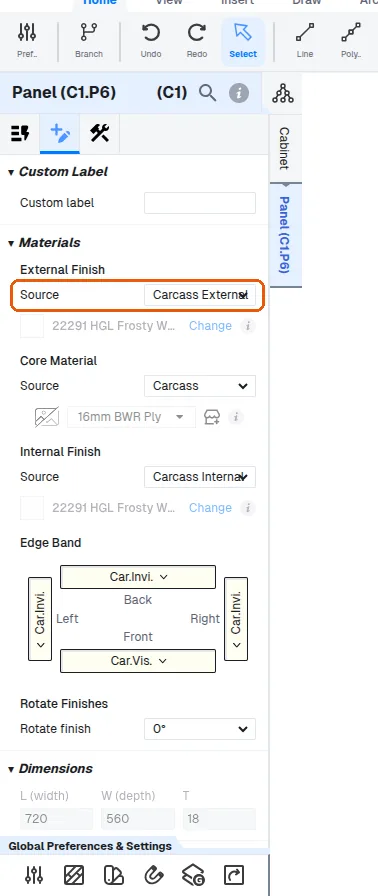
On drawer panels the panel-source dropdown offers Drawer Carcass External / Internal and Drawer Fascia External / Internal.
✓ Vérifié dans le produit le 10 octobre 2026The option chosen determines which unit-level material channel the panel inherits from.
✓ Vérifié dans le produit le 10 octobre 2026