Quotation canvas interactions: scroll, edit, select and search
Learn how the quotation canvas scrolls, opens elements for editing, selects cells and highlights search matches.
Mouse wheel scrolls the quotation canvas in small fixed steps (7 mm per notch), clamped so you cannot scroll past the last row.
✓ Checked in the product on 20 October 2026When the inline summary page is enabled it is drawn above the detailed table and shares the same scroll space, so the scrollable content is taller.
✓ Checked in the product on 20 October 2026Double-clicking an item row opens that quotation element for editing.
✓ Checked in the product on 20 October 2026Rows added by the system — section headers, footers, terms — have no linked element, so double-clicking them does nothing.
✓ Checked in the product on 20 October 2026Clicking selects a cell; Ctrl/Shift/Cmd-click toggles cells in and out of a multi-selection.
Hovering exactly on a column boundary switches the cursor to a resize cursor.
✓ Checked in the product on 20 October 2026The quotation search highlights the matching cell and cycling through results auto-scrolls the canvas to each match (accounting for the inline summary when it is shown).
✓ Checked in the product on 20 October 2026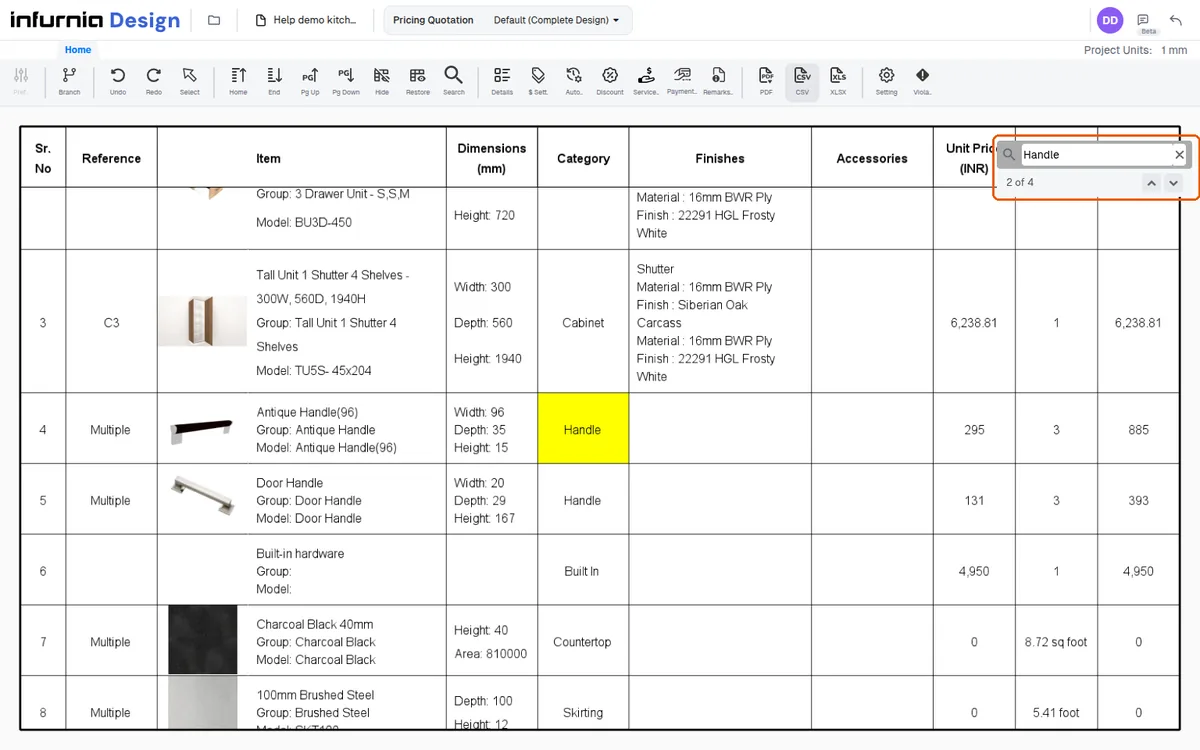
Highlights clear when the search is cleared and do not affect exports.
✓ Checked in the product on 20 October 2026