Resize sheet images and set viewport image scale
Resize images on a sheet without distortion and set a true drawing scale for dynamic viewport images.
Resizing a sheet image via the panel's width/height inputs never distorts it: whichever dimension you changed by the larger amount wins, and the other is recomputed to preserve aspect ratio, keeping the image's top-left corner fixed (crop offsets are rescaled consistently).
✓ Checked in the product on 10 October 2026Values under 1mm are rejected with 'Width and Height should be greater than 1'.
✓ Checked in the product on 10 October 2026Images support their own border settings (show border, thickness in mm, color).
✓ Checked in the product on 10 October 2026Dynamic viewport images - live views of the floorplan/elevation placed on a sheet - additionally expose a scale pairing between design units and presentation mm: the effective scale factor is design-value divided by presentation-value, so a client can dial in a true drawing scale (e.g. 1:50) by entering the pair.
✓ Checked in the product on 22 October 2026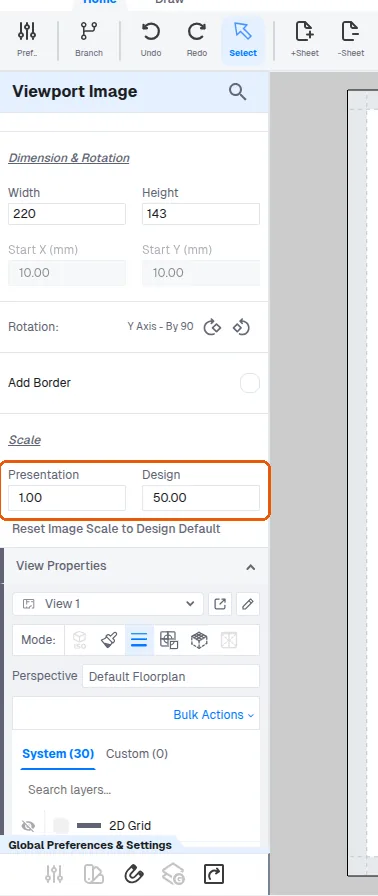
The scale is set by selecting the view and entering the design-to-presentation scale pair (for example 1:25 or 1:50) in the view's scale control; intermediate values such as 1:45 are also accepted.
✓ Checked in the product on 22 October 2026'Reset Image Scale to Design Default' restores the cached design scale factor if the numbers get confused.
✓ Checked in the product on 22 October 2026