Read the Optimization Statistics modal after a comparison run
Run the layout with Decide after Comparison and read each sheet type's sheet count, processing time and offcut figures.
With Optimisation Criteria set to 'Decide after Comparison', a board layout run computes all criteria.
With Optimisation Criteria set to 'Decide after Comparison', a board layout run opens the 'Optimization Statistics' modal: one row per sheet type, one column per criterion (Balanced, Least Material, Least Processing Time).
Each cell shows sheet count, estimated processing time, total viable offcut and the largest offcut footprint.
When composite sheets were used, the 'Optimization Statistics' modal shows the core and finish sheet counts with the sheets saved by compositing shown as green (-n) figures.
✓ 19 اکتوبر، 2026 کو پروڈکٹ میں جانچا گیا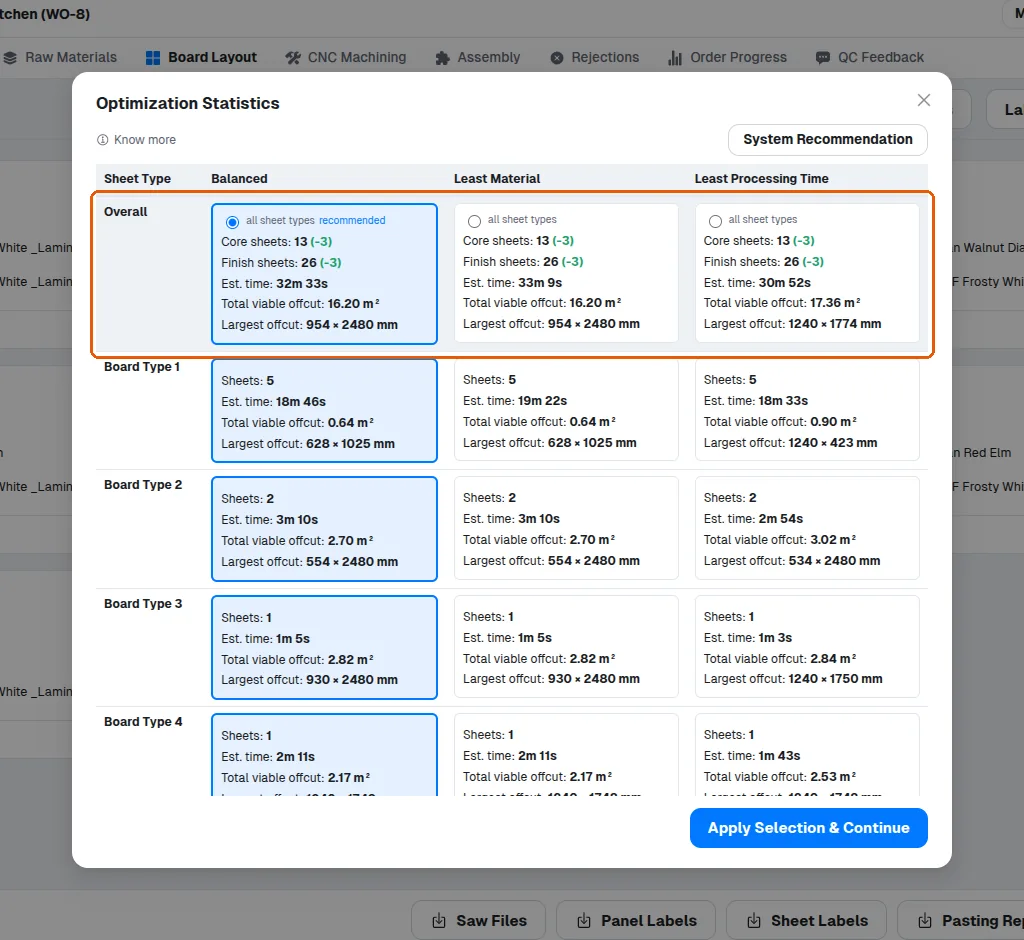
The three criteria can also be compared side by side in one run by choosing 'Decide after Comparison', which computes all of them and lets you pick a winner per sheet type.
✓ 11 اکتوبر، 2026 کو پروڈکٹ میں جانچا گیاThe option the system recommends is highlighted in blue, so it is easy to spot which choice is the strongest recommendation before you apply it.
✓ 11 اکتوبر، 2026 کو پروڈکٹ میں جانچا گیا