Clone SKUs and groups for new materials and thicknesses
Duplicate finish SKUs from the catalogue and clone groups to offer the same board or glass in other thicknesses.
A material (finish SKU) is duplicated from the catalogue with the Clone SKU entries of its cog menu (Clone SKU to same Group, Clone SKU to new Group, Clone SKU to any Group); the copy is then edited as needed.
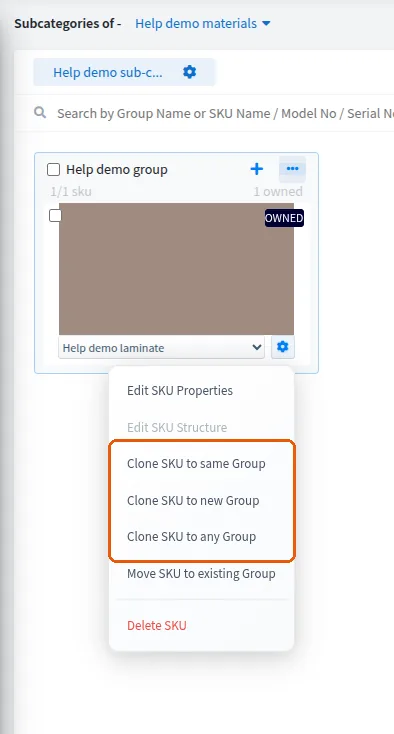
When a required material such as a 3 mm acrylic for a backlit panel is not in the warehouse, create it on the admin portal by cloning an existing prelam material, then set the correct panel thickness and apply the required finishes on the clone.
To offer the same board in another thickness, clone the group, then open the clone's SKU properties and change the thickness value (for example 18 mm to 6 mm or 8 mm).
The description field can be left empty.
After cloning a catalogue group, the clone's size properties (size number, width, height and expansion range) and its display image can be edited, with settings updated after each change, so one base item can be reused for a series of related accessories.
For glass shutters, each non-default thickness (such as 4 mm or 6 mm instead of 8 mm) is offered as its own core material in the catalogue: bulk-clone an existing glass core material into new groups and rename each clone for its thickness, rather than editing the original.