Configure panel and box labels, fields and logo placement
Set which per-panel fields print on panel labels and where the organization logo sits on box labels.
Panel labels (fulfillment tags) print a configurable set of per-panel fields: project ID and name, design name, client name, room name, cabinet name, work order, panel name / annotation / custom label / combined label, external and internal finish, core material, cut size, finished size, operations, per-side edge-bands (front/back/left/right), barcodes, QR code, date, organization name, material code, and the organization logo.
For panels that belong to a panel group (such as grouped skirting or countertop ply panels), the cabinet name field lists the cabinets that own the group's live panels, separated by commas, rather than a single cabinet name.
Dimension precision on cut size follows the org's dimension-accuracy setting.
Templates are now edited as a stack of layers: each field is a layer you can show/hide and reorder, and the label's edge-band strips and border are layers too.
✓ Проверено в продукте 21 октября 2026 г.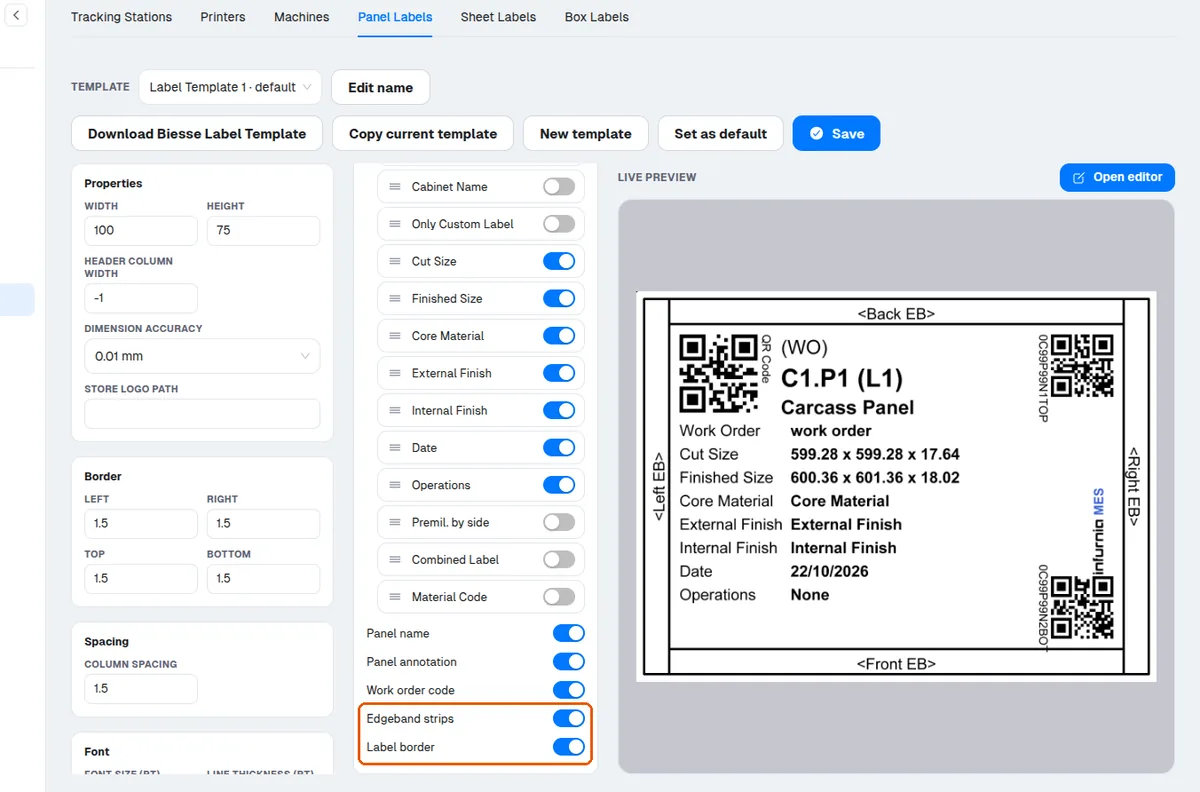
Box/packaging labels can additionally show the organization logo in one of three positions: off, to the left of the QR code (default), or top-left inside the header (which shifts the header fields right).
The logo (and the QR code) appear on the first page of a multi-page label; pages after the first show a compact one-line header with the box name and work order instead, and multi-page labels print a "Page n/N" marker.
The printed logo is always the logo uploaded at organization level — there is no per-label-template logo override.
The logo image loads asynchronously: the first preview generated after changing it may appear without the logo; regenerating the preview shows it.
The same project, client and room names that appear on production labels also appear in the quotation/BOQ header, and the room name is what the room-wise quotation template groups items by, so a wrong name shows up in both places.