Use copy and array to place multiple copies at fixed spacing or count
Place several copies of an item at a fixed spacing or count, or fall back to a single free copy per click.
Open the copy and array tool (shortcut CP then Enter).
✓ 22 ਅਕਤੂਬਰ 2026 ਨੂੰ ਪ੍ਰੋਡਕਟ ਵਿੱਚ ਜਾਂਚਿਆ ਗਿਆ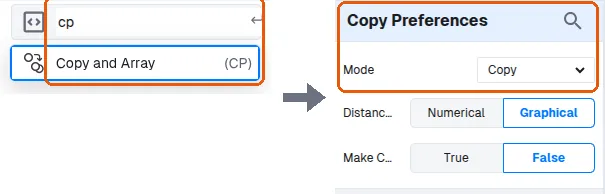
In the copy tool's left panel (Copy Preferences > Mode), choose 'Multiply(Straight) Fixed Copy' to set the number of copies, or 'Multiply(Straight) Fixed Distance' to set the distance between copies.
For three items enter two additional copies, then pick a base point and click to place.
✓ 22 ਅਕਤੂਬਰ 2026 ਨੂੰ ਪ੍ਰੋਡਕਟ ਵਿੱਚ ਜਾਂਚਿਆ ਗਿਆ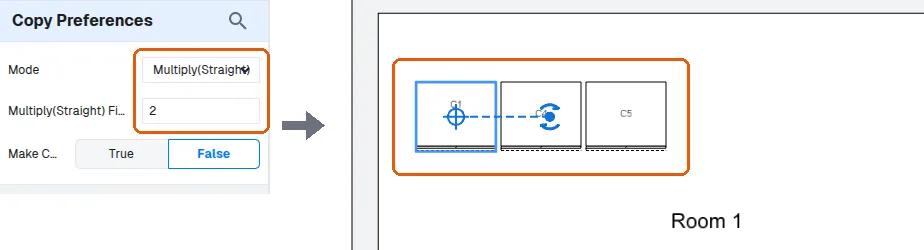
Use the regular copy option instead when you want a single copy per click placed freely.
✓ 22 ਅਕਤੂਬਰ 2026 ਨੂੰ ਪ੍ਰੋਡਕਟ ਵਿੱਚ ਜਾਂਚਿਆ ਗਿਆ