Use the pick tool to select internal wall faces for ceilings and tiling
Pick internal wall faces to sketch a ceiling and apply tiling, then adjust tile material, pattern, size and grout appearance room by room.
To create a ceiling, use the pick tool to automatically select internal wall faces for a quick ceiling sketch, which can then be applied.
Tiling follows a similar process: use the pick tool to select internal faces for automatic application, then modify tile material, pattern, size, and grout appearance.
✓ 20 ਅਕਤੂਬਰ 2026 ਨੂੰ ਪ੍ਰੋਡਕਟ ਵਿੱਚ ਜਾਂਚਿਆ ਗਿਆ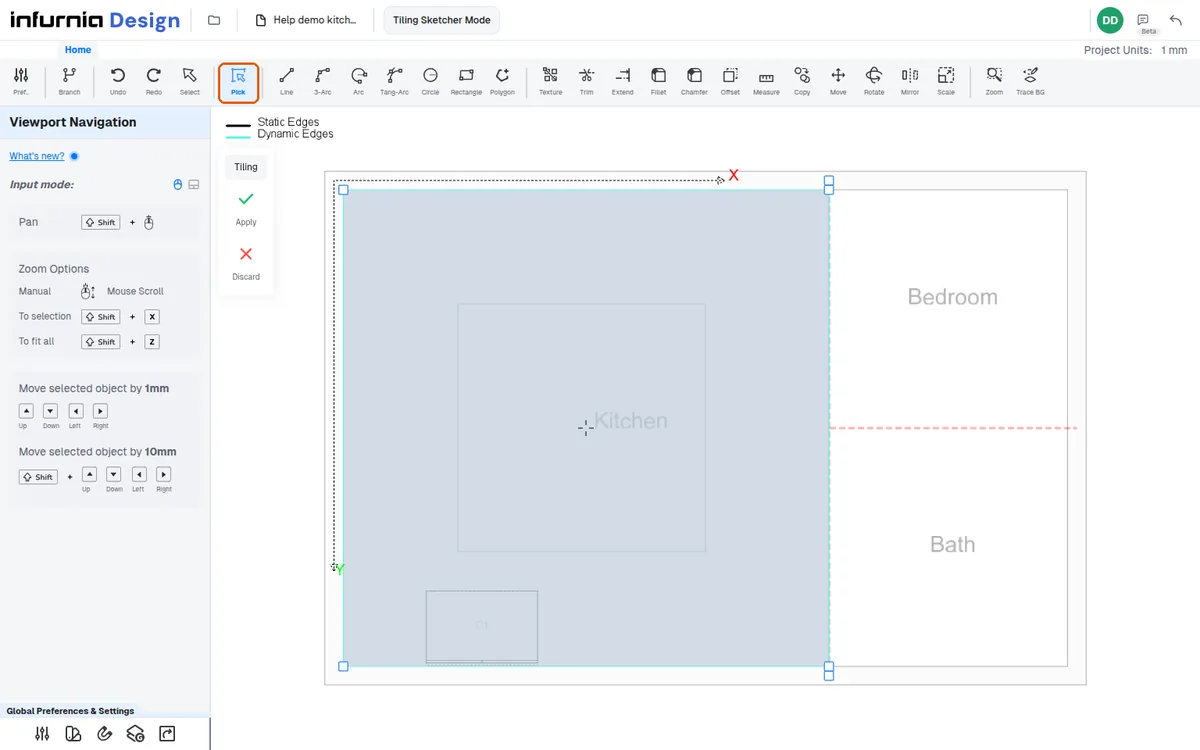
Each room must be selected individually and its ceiling and tiling assigned manually, room by room.
✓ 12 ਅਕਤੂਬਰ 2026 ਨੂੰ ਪ੍ਰੋਡਕਟ ਵਿੱਚ ਜਾਂਚਿਆ ਗਿਆThe software automatically hides ceilings when viewing from the top in 3D, similar to walls.
✓ 20 ਅਕਤੂਬਰ 2026 ਨੂੰ ਪ੍ਰੋਡਕਟ ਵਿੱਚ ਜਾਂਚਿਆ ਗਿਆ