Change hardware depth and manage machining and drilling details
Change a hardware entry's depth, store its machining shape, and keep or remove manufacturing details to control drilling in production output.
A hardware SKU's machining shape is stored in its manufacturing details additional property as a JSON definition of panel contours, and when the hardware is placed those contours are cut out of the panel.
Hardware depth is changed from the hardware entry's Edit SKU Properties form: expand Additional Properties, adjust the depth value and save with Update Details, then reload and add the hardware again.
✓ 21 ਅਕਤੂਬਰ 2026 ਨੂੰ ਪ੍ਰੋਡਕਟ ਵਿੱਚ ਜਾਂਚਿਆ ਗਿਆ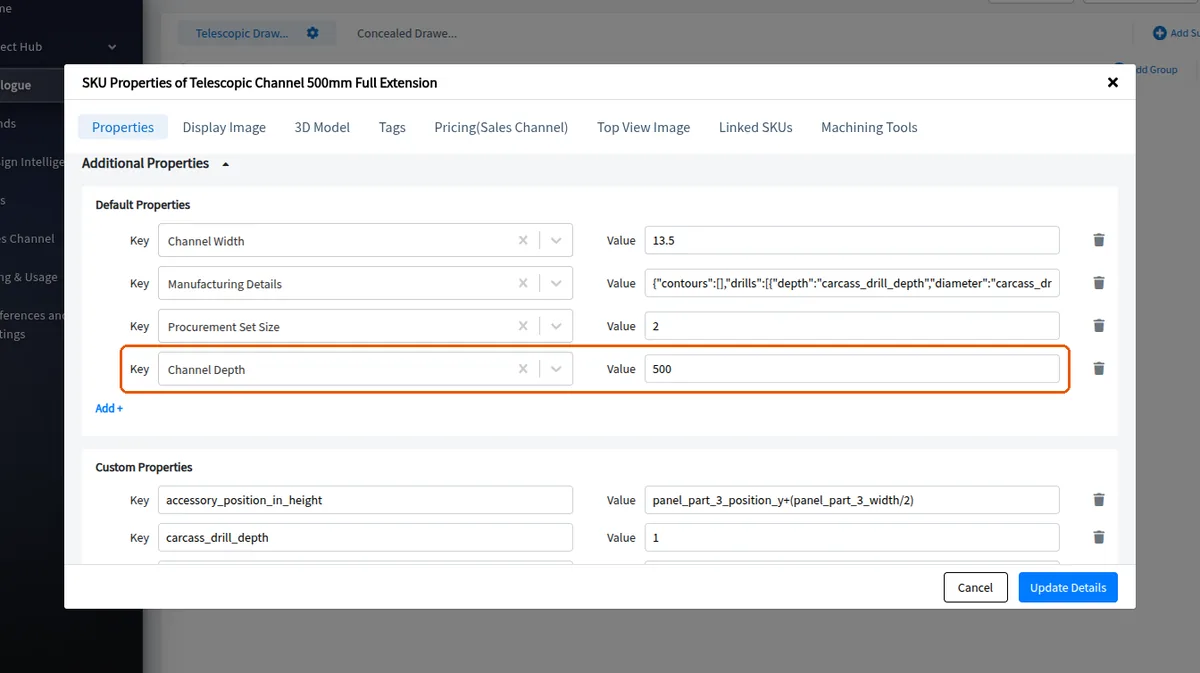
If the new depth still does not apply, check the depth setting at the drawer level instead.
Drilling diameter and depth are kept as flexible values inside the hardware's manufacturing details property, so they can be edited from the SKU's properties at any time.
Keep the manufacturing details in place when the drilling is needed for production output.
Removing the manufacturing details additional property from a hardware SKU means no drilling is generated for it in production output, so hinge variants can be held in the catalogue without unwanted screw holes appearing in the cut list.