Work out drawer depth from the selected channel
Trace how the drawer depth follows the channel depth minus the Depth Reduction, and why the channel is chosen manually.
The drawer depth is derived from the depth of the selected channel: it is the channel depth minus the drawer's Depth Reduction, so choosing a channel with a different depth in the catalogue changes the drawer depth accordingly. The cabinet's back panel offset plays no part while a channel is fitted.
There is currently no automatic channel selection: changing the drawer depth does not switch the channel by itself — the channel (and therefore the depth it imposes) is chosen manually from the catalogue.
✓ 2026 ഒക്ടോബർ 16-ന് പ്രോഡക്റ്റിൽ പരിശോധിച്ചുThe drawer depth is the channel depth minus the Depth Reduction value entered in the drawer's Other Parameters, so setting the Depth Reduction to match the telescopic channel's projection keeps the drawer box sized correctly.
✓ 2026 ഒക്ടോബർ 16-ന് പ്രോഡക്റ്റിൽ പരിശോധിച്ചുThe channel depth is shown read-only in the drawer's channel parameters.
✓ 2026 ഒക്ടോബർ 18-ന് പ്രോഡക്റ്റിൽ പരിശോധിച്ചു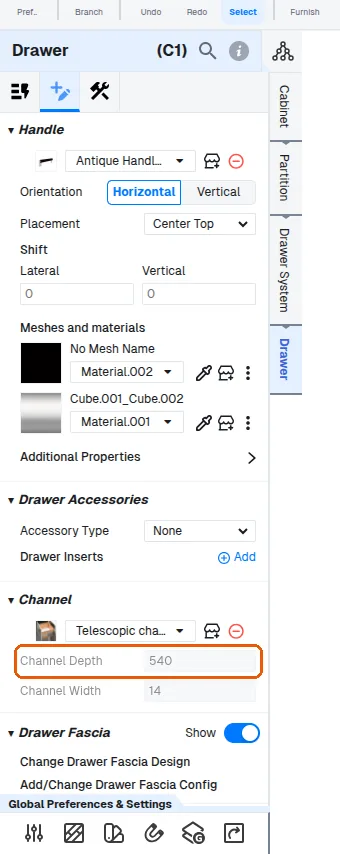
The channel depth comes from the channel item when the item declares one (its channel depth property, for example 500 for a 500 mm channel); for an item without it, Channel Depth follows the drawer's depth.
✓ 2026 ഒക്ടോബർ 18-ന് പ്രോഡക്റ്റിൽ പരിശോധിച്ചു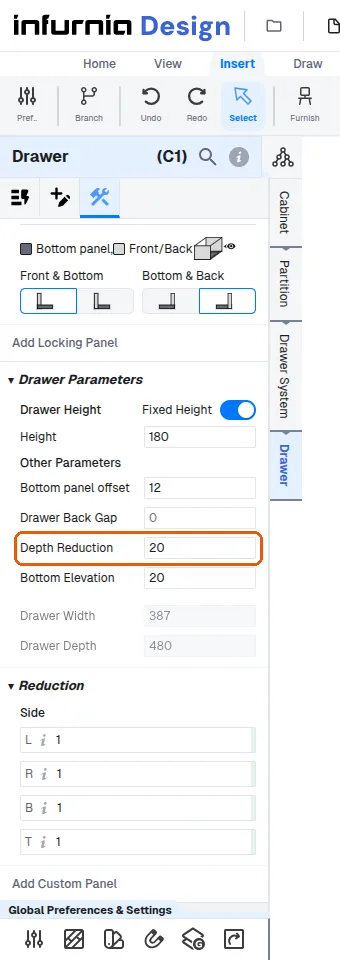
When the channel item declares no depth, the channel depth mirrors the drawer's depth before its Depth Reduction: with a Depth Reduction typed, the drawer is that much shorter than the channel (Channel Depth 540, Drawer Depth 533 with a Depth Reduction of 7).
A different channel depth means choosing another channel item.
The drawer depth then follows as the channel depth minus the drawer's Depth Reduction.
✓ 2026 ഒക്ടോബർ 18-ന് പ്രോഡക്റ്റിൽ പരിശോധിച്ചു