How bulk SKU structure edits are published and discarded
Learn which fields get published, why the confirm button can stay disabled, and when edits are lost.
There are two entry points for bulk-editing SKU structure (cabinet/wardrobe construction parameters, partitions, panels): the 'Bulk Edit SKU Structure' item in the catalog bulk-selection menu, and a full-screen standalone page that the design app embeds (it can be filtered to corner units via an element_type=corner_unit URL parameter). In both, the user edits a structure form and clicks 'Proceed to confirmation'. Before confirmation the app strips every empty/unchanged value - only non-empty edited properties (plus any edited partition/panel entries) are included in the published change set, so leaving a field blank means 'don't touch it', not 'clear it'. The confirmation view shows only the edited fields ('show only edited'); the 'Confirm Changes and exit' / publish button remains disabled if nothing effective was changed - users who report the confirm button not working have usually edited nothing or only cleared fields. In the catalog path the publish triggers a background job and the toast includes a Task id and timestamp for follow-up; in the embedded standalone page the confirmed JSON is posted back to the parent design application window.
✓ 2026年10月19日に製品で確認済み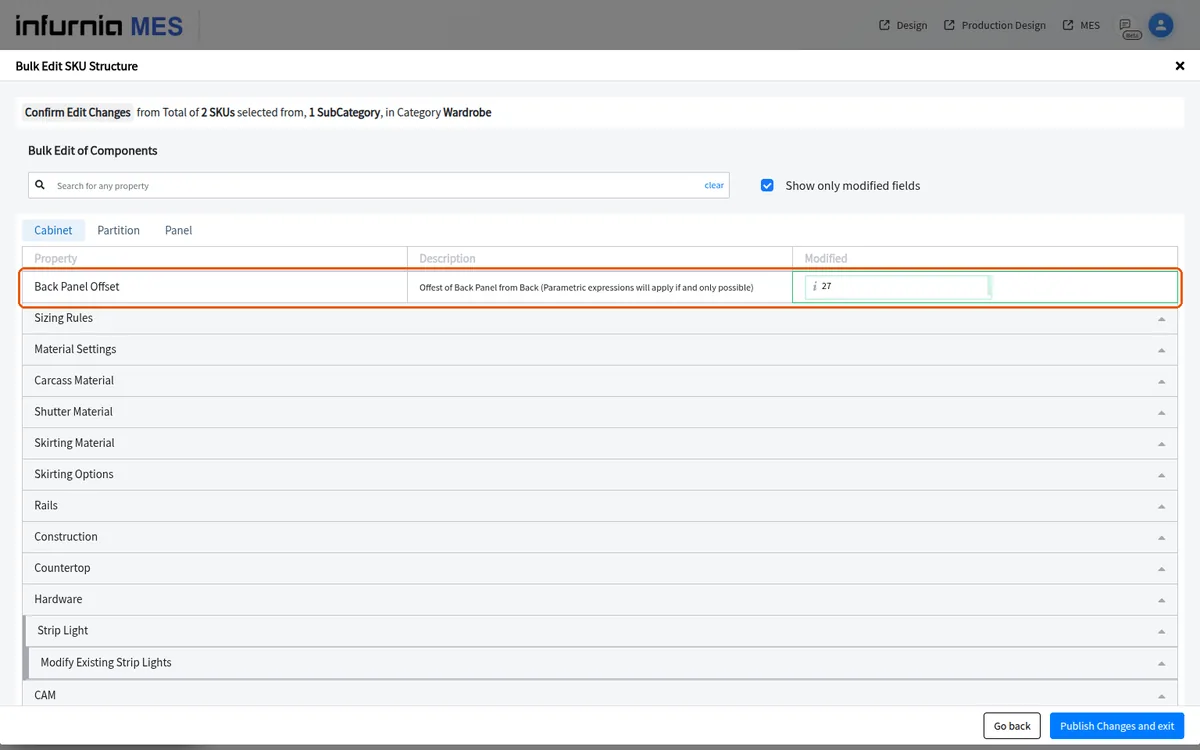
Catalogue structure edits are not auto-saved: changes made in the structure editor are only applied when the user explicitly confirms and publishes them, so leaving the editor without confirming discards the edits.