Add stability rails to a cabinet and let the system space them
Select a cabinet, add the number of stability rails your standards call for, and let the system space them evenly across the back.
Stability rails are horizontal strengthening strips that run across the back of the carcass. Their position is worked out from the side, bottom and top panels rather than from the back panel, so they stay correctly placed even when the back panel changes.
Stability rails are set from Carcass > Stability Rails: 'No of rails(to add)' adds that many rails to the existing ones, and the system spaces them evenly between the bottom and top panels, spanning the full width between the side panels, with a configurable rail height.
✓ Verificato nel prodotto il 22 ottobre 2026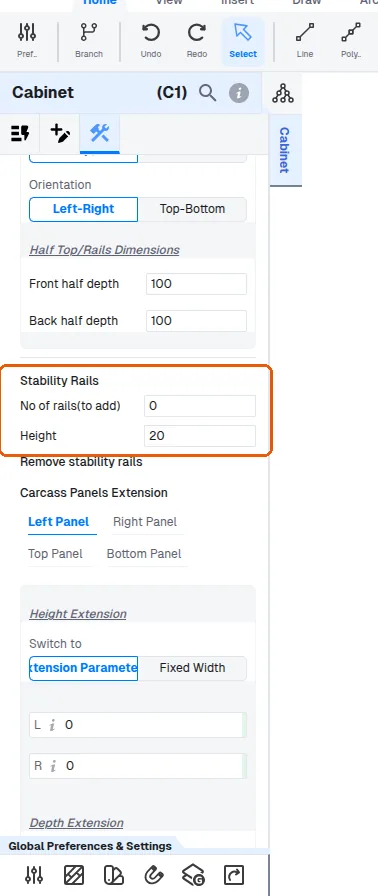
Stability rails are added from the cabinet's property panel on the right after the cabinet is selected, using the add-rails control there.
The user adds stability rails with 'No of rails(to add)'.
✓ Verificato nel prodotto il 22 ottobre 2026'No of rails(to add)' adds that many to the existing rails.
✓ Verificato nel prodotto il 22 ottobre 2026How many rails to add follows the company's own standards.