Add a drawer set and additional drawers from the partition
Add a drawer set at partition level, then add extra drawers and set each one's face and box height individually.
A drawer set is added from the partition level (the Drawer Set dropdown on the partition).
✓ Checked in the product on 18 October 2026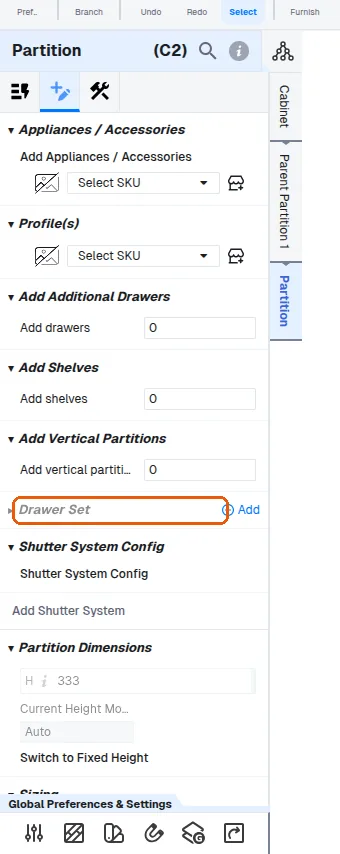
Removing an existing drawer set clears all drawers of that partition's drawer system before the new set is added.
✓ Checked in the product on 18 October 2026The additional drawers are added from the drawer system's customize option: choose 'Add Additional Drawers' and enter the number of drawers required, and the construction set for the system applies to the drawers created.
✓ Checked in the product on 18 October 2026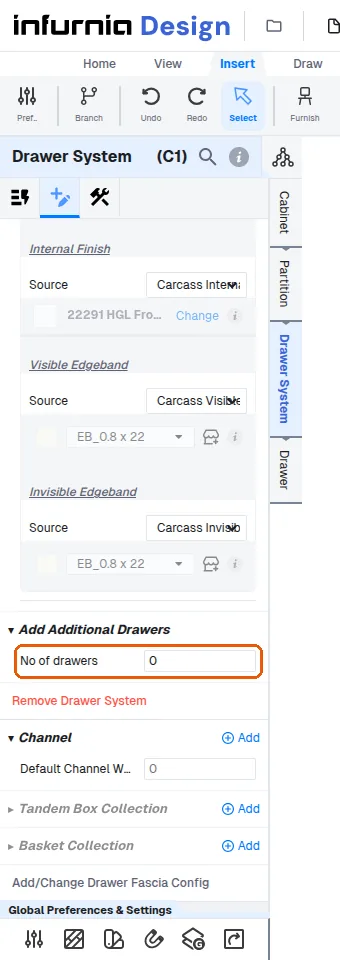
Additional drawers can be added from the drawer system's 'Add Additional Drawers' control, where you enter the number of drawers to add.
✓ Checked in the product on 18 October 2026After adding the additional drawers from the drawer system's customize option, each drawer's face height and box height are set individually at drawer level, and the box height can be set smaller than the face height.