Add and configure partitions, shelves, drawers and shutters
Add components at partition level so each shelf, drawer set or shutter system applies only to that portion of the unit.
Partitions can also be added at partition level.
✓ Checked in the product on 10 October 2026Components such as shelves and hangers can be added at the selected partition level so they apply only to that portion.
✓ Checked in the product on 10 October 2026At partition level you can add a drawer set, add a shutter system, or add a shelf.
Shelves are added at partition level.
✓ Checked in the product on 10 October 2026Shelves are added at partition level.
✓ Checked in the product on 21 October 2026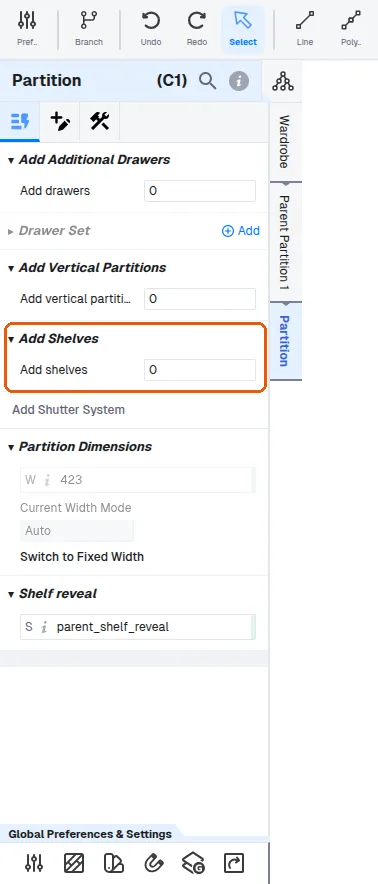
Shelves can then be set as fixed or adjustable at panel level.
✓ Checked in the product on 10 October 2026To control the vertical spacing between shelves, select the space between two panels (for example the top panel and the first shelf) and set that section's partition height to the desired value; repeat this for each section, setting each partition height individually.
✓ Checked in the product on 10 October 2026For drawers, set each drawer height individually (for example 180, 270, 200 or 250).
✓ Checked in the product on 9 October 2026For drawers, choose the accessory type such as a tandem drawer.
✓ Checked in the product on 9 October 2026The shutter mechanism can be set to Double Swing (or Single Swing, Rolling, Sliding or Lift Up).
Stepping back to a parent partition (shown as Parent Partition 1, 2, 3…) lets you edit what was added beneath it.
✓ Checked in the product on 10 October 2026