Grant MES roles per user and load mapped stations
Turn on MES roles for individual users without admin rights and reload so mapped station data appears.
MES/production and designer access is granted per user from the admin portal's User Management area by editing the user (or adding an existing org user to MES) and turning on the relevant MES roles.
✓ Am 20. Oktober 2026 im Produkt geprüftTurning on the relevant MES roles grants access to make the related changes without giving the user admin rights.
After a user is added to a tracking station, reload the browser once so all mapped station data loads.
The add-user form in the MES Users area takes the person's email, first name, last name and contact number, and requires at least one MES role (MES Operator or MES Admin) to be selected before the user can be added.
✓ Am 20. Oktober 2026 im Produkt geprüft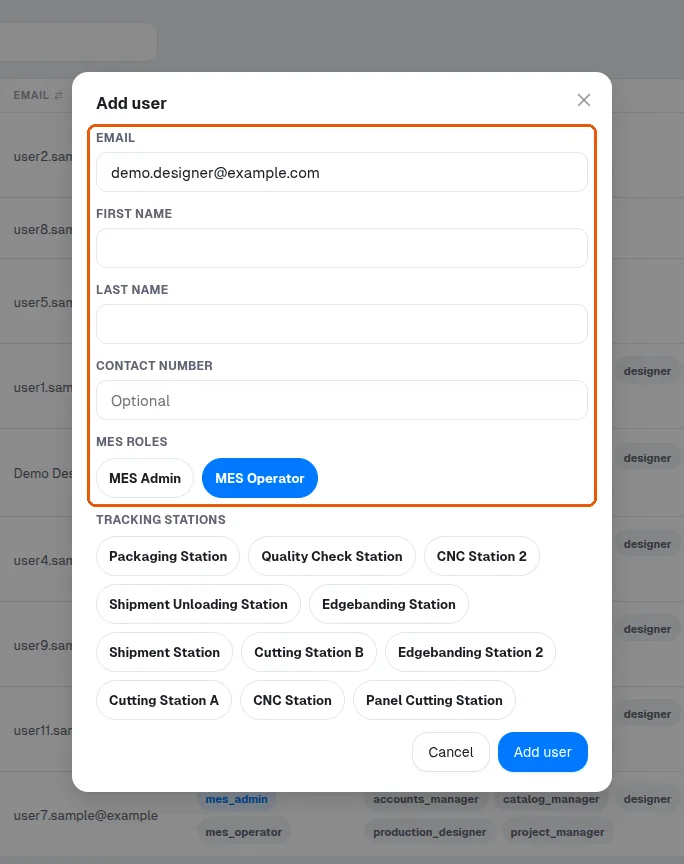
Assigning each factory worker only the station they actually work at reduces the risk of a panel being ticked against the wrong operation, since each scan is recorded at whichever station is currently selected.