How SKU discounts and the Other Discount line are calculated
See how discounts set on a SKU's price row are computed per element in a quotation and how they combine with quotation-level discounts and admin caps.
Admins can configure a discount directly on a SKU's price row (percentage or absolute, per sales channel and price type).
✓ Am 20. Oktober 2026 im Produkt geprüft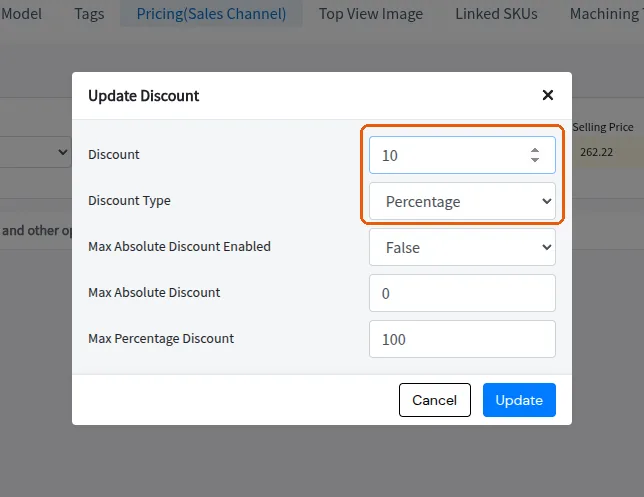
In the quotation these are computed per element — percentage of the margined+taxed unit price, or an absolute amount per display unit multiplied by the element's area/length/count.
✓ Am 10. Oktober 2026 im Produkt geprüftQuotation-level percentage discount rows apply AFTER SKU discounts are reserved (their base is bucket total minus SKU discounts), so a 10% quotation discount does not re-discount already-discounted SKUs.
✓ Am 10. Oktober 2026 im Produkt geprüftSKU discounts follow the same row-quantity rules as the price: the row total already carries the count (self price x count plus children at their true quantities), and output-quantity copies are applied by expanding the row into one row per copy rather than by a separate multiplier.
Per SKU per price list, admins can preset a discount (percentage or absolute) and, separately, cap what designers may discount at quotation time: max_percentage_discount (default 100, i.e. effectively uncapped) and max_absolute_discount, which only applies when max_absolute_discount_enabled is switched on (default off, value 0). The caps live on the price row itself, so they can differ per sales channel and per price type. At design time the core checks the discount applied to each SKU: exceeding the absolute cap produces the warning 'SKU discount of <name> is exceeding the upper cap of <value> set by Admin', and likewise for the percentage cap; the absolute cap is compared in the price's display unit. So when a designer reports 'the system will not accept my discount' or shows the exceeding-cap warning, the resolution is for a catalog manager to raise (or disable) the caps on that SKU's price for the active sales channel and price type in Price Settings — the designer cannot override the cap from the design side.