Publish a work order to unlock downloads
Publish the work order so its downloads become available and an immutable published design version is created.
Until the work order is published, most downloads are blocked: the cut list's Download CSV and Custom Cutlist, the CNC Machining tab's Drawing download and the board layout's Saw Files, Panel Labels, Sheet Labels and Pasting Reports are disabled. The CNC Machining tab says 'Outputs can only be downloaded from a published work order. Publish this work order to enable downloads.' The cut list's Download PDF and the board layout's Board Layouts button stay enabled.
✓ ২০ অক্টোবর, ২০২৬ তারিখে প্রোডাক্টে যাচাই করা হয়েছে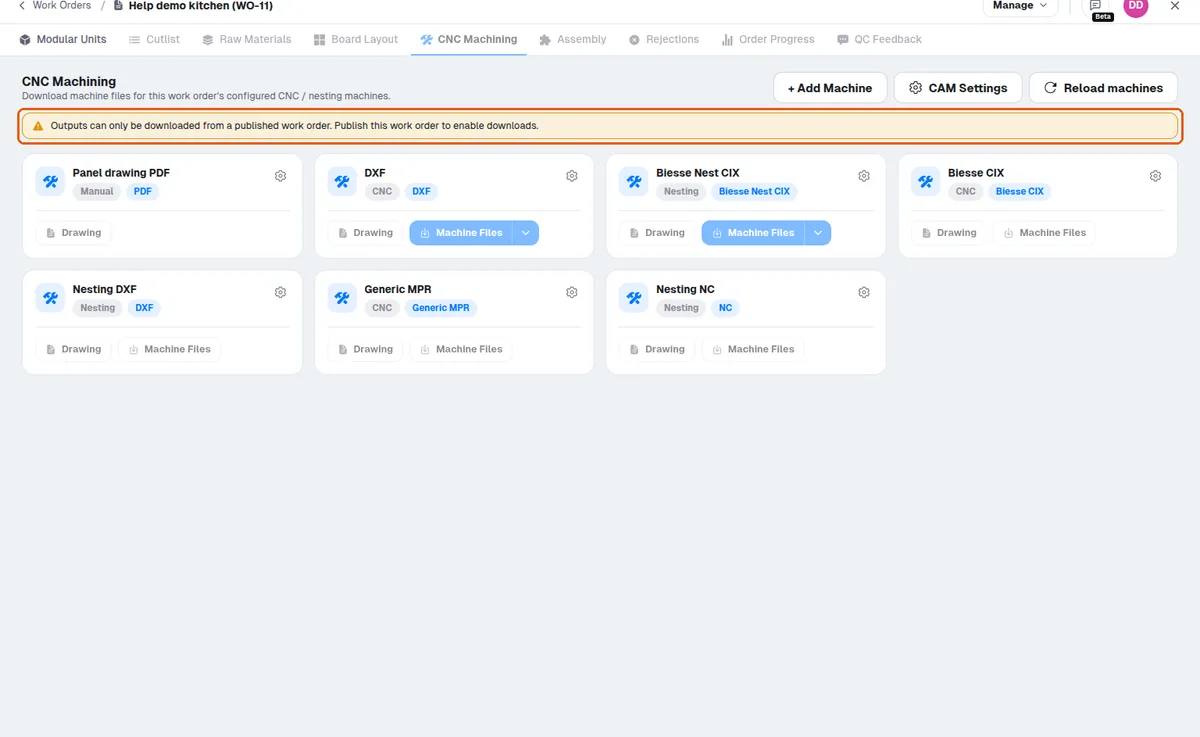
The board layout's Saw Files (the beam saw machines' files) are only available once the work order is published. The hardware PDF (Raw Materials > Hardware BOQ — PDF, with quantity, category and type) is not held back: its button stays enabled on an unpublished work order and gives a PDF there too; the Hardware BOQ — CSV waits for publishing.
Publishing the work order also creates an immutable published version of the design.
The immutable published version of the design (opened from the work order's Modular Units > View Design) can only be viewed: it offers its Floorplan and 3D views, with the Elevations list in the Floorplan panel, and no editing tools.
In the immutable published version of the design, cabinets cannot be modified.
✓ ১৯ অক্টোবর, ২০২৬ তারিখে প্রোডাক্টে যাচাই করা হয়েছে