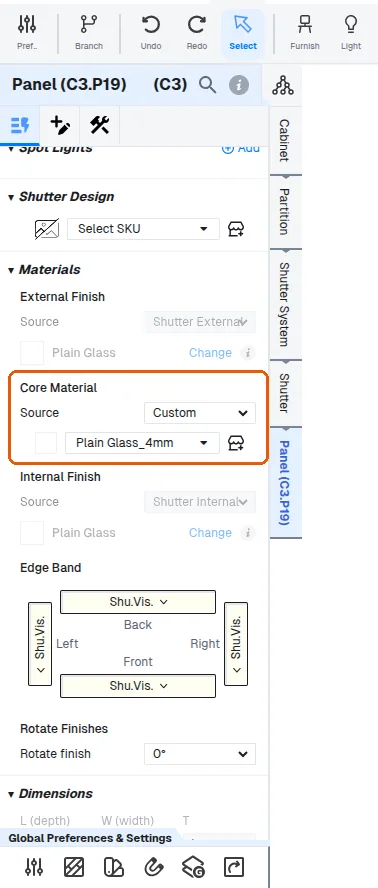
Use glass shutters without extra catalogue units
Switch shutters to glass and make shelves glass without creating a separate catalogue unit per glass type.
Rather than creating a separate catalogue unit for each glass type (which would bloat and confuse the catalogue), switch a cabinet's shutters to a different material such as glass by selecting the shutter at the cabinet level and changing it there.
To avoid changing the core material on each unit individually, clone an existing unit and save a dedicated glass-shutter variant for single and double shutters.
To make the shelf glass too, work at panel level, set the shelf as fixed or adjustable, set its core material source to custom, then choose the glass thickness (e.g. 6 mm or 8 mm).
✓ تم التحقق منه في المنتج في 21 أكتوبر 2026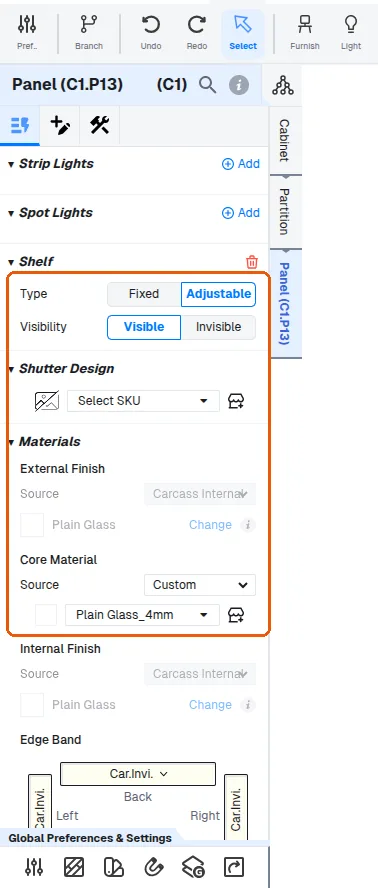
The glass colour can then be changed and the shutter scales correctly.
The core material can then be changed at the panel level.
✓ تم التحقق منه في المنتج في 21 أكتوبر 2026